Set Up Statistical Calculations
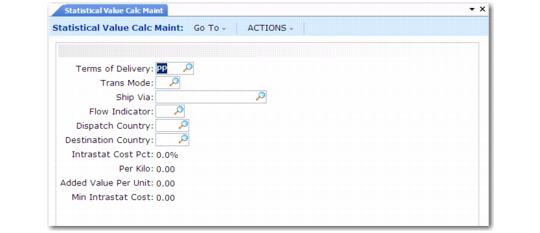
Use Statistical Value Calculation Maintenance (29.22.1.19.1) to set up parameters for automatically calculating the statistical value of goods at the border for Intrastat reporting. This value should include transportation costs up to the border, insurance, and so on.
Use Statistical Value Calculation Browse (29.22.1.19.2) to display the information entered in the maintenance program.
In Statistical Value Calculation Maintenance, enter the additional charges associated with the particular combination of terms of delivery (FOB point), transport mode, ship via, flow indicator, country of dispatch, and destination country. The charges can be calculated as a percentage of the total value of the shipment, a fixed amount for each kilogram in weight, or as a fixed amount per unit contained in the shipment. A minimum amount for the charges can be entered.
The values entered are used in the calculation of the statistical value. If an exact match cannot be found, Intrastat searches for a partial match in the following order (unlisted fields are blank):
1 Terms of delivery code, transport mode, ship via, flow indicator, dispatch country, destination country
2 Terms of delivery code, transport mode, ship via, flow indicator
3 Terms of delivery code, transport mode, ship via
4 Terms of delivery code, transport mode
5 Terms of delivery code
6 Everything blank
Statistical Value Calculation Maintenance (29.22.1.19.1)
Terms of Delivery
Enter the Intrastat terms of delivery (FOB point) used to calculate the statistical value of the relevant goods at the border for Intrastat purposes.
Trans Mode
Enter a one-character code that identifies the mode of transport used to carry the goods to the border. This field is validated against codes set up in Mode of Transport Maintenance.
Ship Via
Enter a code that identifies the method of transport for shipping goods to this customer. The system verifies that a valid relationship is defined between the transport mode and the ship via codes in Intrastat Transport Maintenance. See
Associate Transport Modes with Ship Via Codes.
Flow Indicator
Enter the code used in your country to indicate Intrastat arrival or departure transactions. This field is validated against codes set up in Flow Indicator Maintenance.
Dispatch Country
Enter a valid code defined in Country Code Maintenance that identifies a country where shipments originate.
Destination Country
Enter a valid code defined in Country Code Maintenance that identifies a country that receives shipments.
Intrastat Cost Pct
Enter a percentage value to add to or subtract from the total value of the invoice to determine the statistical charge. The default is 0 (zero).
When a value other than zero is entered, the statistical value of the goods is calculated as a percentage value.
Per Kilo
Enter the amount to add to or subtract from the total value of the invoice for each KG in weight sent or received in this shipment. The default is 0 (zero).
This amount is calculated in the domain base currency.
When a value other than zero is entered, the statistical value of the goods is calculated as a fixed amount per KG.
Added Value Per Unit
Enter the amount to add to or subtract from the total value of the invoice for each unit contained within this shipment. The default is 0 (zero).
This amount is calculated in the domain base currency.
When a value other than zero is entered, the statistical value of the goods is calculated as a fixed amount per unit.
Min Intrastat Cost
Enter the minimum amount for the statistical charges. Use transport and insurance costs to help determine what this amount should be.