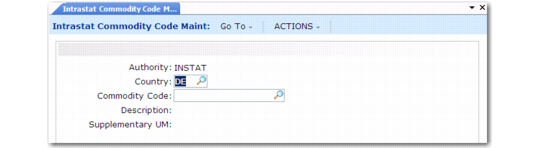
Set Up Intrastat Commodity Codes
Use Intrastat Commodity Code Maintenance (29.22.3) to set up codes for classifying goods for Intrastat reporting. Create codes for each EU country, since each has its own coding scheme for the last four digits.
Specify a default commodity code in Intrastat Control or associate a code with each Intrastat item in Item Intrastat Data Maintenance (29.22.6). During order entry, the user can override this value.
Note: Intrastat commodity codes are distinct from the corporate commodity codes defined in Commodity Code Maintenance (1.4.19).
Intrastat Commodity Code Maintenance (29.22.3)
Country
Enter a valid country code for a country in which your company has sites. Create a separate record for each country.
Commodity Code
Enter a commodity code.
Description
Enter a brief description (maximum 24 characters) of the commodity.
Supplementary UM
Enter an optional supplementary unit of measure. For conversions, this value must be defined in Unit of Measure Maintenance (1.13).
Some commodity codes require that an item be tracked in a specified unit of measure. If the line UM differs from the supplementary UM when Intrastat history records are created, the line quantity is converted to the supplementary UM.
Services
Select this field when the commodity is for services. If it is, additional fields are needed in the Intrastat file.