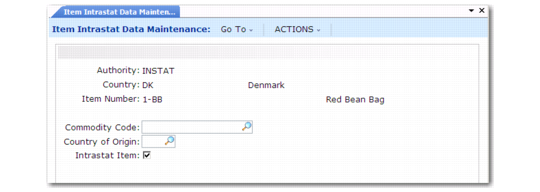
Set Up Intrastat Item Data
Use Item Intrastat Data Maintenance (29.22.6) to associate Intrastat data with inventory items involved in Intra-EU transactions. The values entered here appear in orders as defaults, and can be changed at order entry. Create a record for each EU country.
Note: Intrastat history is created only for items set up in this program.
Item Intrastat Data Maintenance (29.22.6)
Authority
This is automatically set by the system to INSTAT.
Country
Enter a valid, active code defined in Country Create.
Item Number
Enter an item number.
Commodity Code
Enter a commodity code previously associated with the specified country in Intrastat Commodity Code Maintenance (29.22.3).
Country of Origin
Enter a valid, active code indicating the country of origin.
Intrastat Item
Enter Yes to have the system automatically create Intrastat history records for the item. For items for which you do not want Intrastat records created, such as intangible goods or items related to motorized vehicles, enter No.