Recording Intrastat for Orders
This chapter describes the processes by which you can record intrastat data.
Record Intrastat Data in Sales Order MaintenanceDescribes Intrastat-specific fields in Sales Order Maintenance.
Record Intrastat Data in Sales Order Maintenance
This section describes how to enter Intrastat data in Sales Order Maintenance (7.1.1). Use the same steps to record Intrastat data in most other standard order maintenance programs.
1 Use Sales Order Maintenance (7.1.1) to enter an order as usual.
Sales Order Maintenance (7.1.1)
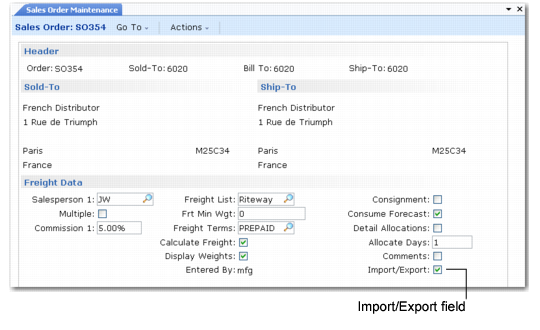
Import/Export
Enter Yes to record Intrastat data for this order. This setting defaults to Yes when Imp/Exp Default is Yes in Intrastat Control and the ship-from and ship-to site addresses are members of the EU.
If No, special processing does not occur during order maintenance. You can still add Intrastat data later using Intrastat Maintenance (29.22.13).
2 Click Next to enter order lines.
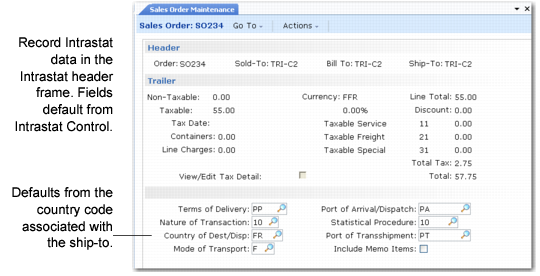
3 When you complete entering lines, click Trailer and then click Next through the sales order trailer. When you complete the trailer, the Intrastat header frame displays. Data from the sales order trailer such as ship via is used in the calculation of statistical values. Ship via also sets the default transportation mode.
Sales Order Maintenance, Intrastat Header Frame
The system automatically copies the default Intrastat header data to each order line.
4 Click Next. A number of country-specific prompts may display depending on the ship-from country involved in the transaction. For example, you may be prompted to indicate if this Intrastat data is a correction of previously recorded data. This is a requirement in Italy and the Netherlands.
The display of this frame depends on a value being specified for either of the correction flow indicator codes in Intrastat Control that is different than the standard arrival or dispatch code. See
Correction Flow of Dispatch and Arrivals.
If this is a correction, specify Yes to Correction and enter the ID of the original document this document is correcting. Otherwise, leave the fields blank and click Next.
5 Click Next again. You are prompted to view or edit import/export data.
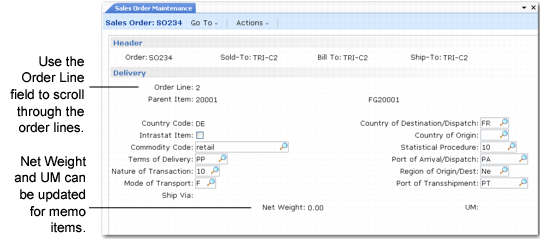
Choose Yes to display the following screen.
Sales Order Maintenance, Intrastat Detail
In most cases, Intrastat codes entered in the order header apply to all order lines. Where there are exceptions to this, Intrastat information can be entered and maintained at the line level.