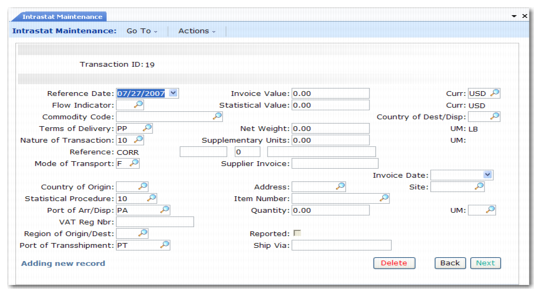
Intrastat Maintenance
Use Intrastat Maintenance (29.22.13) to add and modify Intrastat history records directly. You may need to do this if the data was not entered correctly during the inventory movement transaction. It can also be used for the few transactions where data is not entered automatically, such as:
• Installed base item movements in Installed Item Move (11.3.13)
• Goods sent out for processing in the Advanced Repetitive module using the programs on the Subcontract Shipping Menu (18.22.5)
Note: You cannot modify Intrastat history records that have been printed on a declaration with Last Edition set to Yes.
Intrastat Maintenance (29.22.13)
The following are some of the key fields in this program:
Invoice Value and Currency
Enter the invoice value in transaction currency.
Statistical Value
Enter the statistical value of the order. This field defaults from the invoice value in base currency.
Net Weight
Enter the weight of the transaction in kilograms. The unit of measure for kilograms is specified in Intrastat Control. If net weight is not specified, it is calculated based on the net weight and UM associated with the item in Item Master Maintenance.
Supplementary Units
The system calculates and displays the number of supplementary units, based on the supplementary UM associated with the item’s commodity code, if any. If the line quantity UM is different from the commodity code’s supplementary UM, the system automatically applies the conversion factor defined in Unit of Measure Maintenance.
If a supplementary UM is not available, supplementary units are not calculated.
Reference
Specify which document contains the Intrastat data. This field is normally updated by the system and displays the order type, order number, and order line or reference (invoice number or receiver number). For manually created records, the order type is automatically set to CORR (correction).