QAD 2017 Enterprise Edition
>
User Guides
>
Lean Manufacturing
>
Kanban Setup
>
Setting Up Kanban Supermarkets
Setting Up Kanban Supermarkets
A kanban supermarket is a controlled and managed inventory point for in-process goods or finished items. It typically is supplied by a kanban loop and also can serve as the source for other loops. See
Supermarkets.
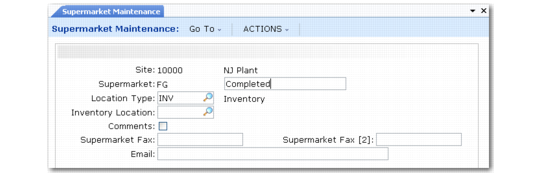
Use Supermarket Maintenance (17.1.2) to set up supermarkets that can then be specified as the source or destination of a kanban loop in Kanban Master Maintenance.
Supermarket Maintenance (17.1.2)
Specify a site, alphanumeric identifier, and optional description for each supermarket. Use the other fields to define the following characteristics:
Location Type
Specify the type of inventory that is stored at this supermarket.
Inv: Finished items, where the supermarket inventory is part of the on-hand balance. Finished items typically include finished goods, subassemblies, fabricated parts or weldments, mixes or blends, and purchased parts or raw material. This is the default value.
WIP: Work-in-process goods, such as partially completed subassemblies or finished items—typically raw materials—that have been issued out of inventory and that are part of work in process.
Inventory Location
Optionally enter the location code associated with this supermarket. For inventory supermarkets, you should identify the location to be used in inventory transactions.
Comments
Enter Yes to update or enter comments related to this kanban supermarket; otherwise, enter No. Comments defaults to Yes if comments are already associated with the supermarket; otherwise, the default is No.
When Comments is Yes, the transaction comments screen displays for you to enter or review comments regarding this supermarket.
Supermarket Fax and E-mail
Optionally enter fax and e-mail information for this kanban supermarket to be used in dispatch list processing. See
Generate Dispatch Lists.
Note: You also can enter a secondary fax number.
When dispatch lists are processed, kanban data can be sorted by supplying source and/or consuming destination. The dispatch list can be faxed to the supplying source, consuming destination, or both.
The system first looks for a loop-specific supermarket fax or e-mail number defined for the destination supermarket in Kanban Master Maintenance. If not specified, it uses values defined here.
Note: When creating a new loop based on records imported using Kanban Workbench Import (17.2.17), the system creates a supermarket master record if the destination supermarket specified in the import file does not already exist. For a new loop with a source type of Inv, the system also creates a source supermarket if required. See
Kanban Supermarkets.