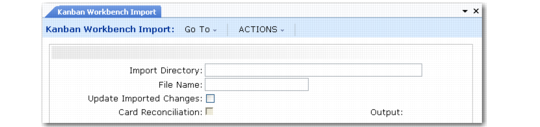
Field Name | Format | Description |
knb_primary_key | decimal | Kanban Loop ID: Internal keyid of knb_mstr record exported from the system. When this field is blank, the system attempts to create a new kanban loop. |
part | character | Item number |
step | integer | Process step |
site | character | Supermarket site |
supermarket_id | character | Supermarket ID |
source_type | character | Source type (enter number representing language detail value): • 1 - Supplier • 2 - Inv • 3 - Process |
source_ref1 | character | Value varies by source type: • Supplier: Supplier address • Process: Process site • Inventory: Source site |
source_ref2 | character | Value varies by source type: • Supplier: PO number • Process: Process ID • Inventory: Supermarket ID |
source_ref3 | character | PO line; used only when source type is supplier |
epei_rev | decimal | EPEI |
daily_demand_rev | decimal | Daily demand |
demand_pct_rev | decimal | Demand percent |
replenishment_rev | integer | Replenishment time (in seconds) |
fifo_time_rev | integer | Internal FIFO time (in seconds) |
fifo_ext_time_rev | integer | External FIFO time (in seconds) |
safety_stock_rev | decimal | Safety stock |
safety_time_rev | decimal | Safety days |
var_factor_rev | decimal | Variability |
order_qty_rev | decimal | Order quantity |
order_qty_mult_rev | decimal | Order quantity multiple |
kanban_qty_rev | decimal | Kanban quantity |
number_of_cards_rev | integer | Number of cards |
buffer_maximum_rev | decimal | Buffer maximum |
order_point_rev | decimal | Order point |
epei_auto_calc_rev | logical | EPEI auto calculate |
epei_conv_factor | decimal | EPEI conversion factor: Used to change the EPEI display value into days (as stored in the database) |
no_of_resources | decimal | Number of resources |
min_process_epei | decimal | Minimum process EPEI |
lead_time_method | integer | Lead time method (enter number representing language detail value): • 1 - Fixed • 2 - Variable |
load_limit | decimal | Load limit |
min_process_item_epei | decimal | Minimum item EPEI |
item_yield_pct_rev | decimal | Item yield percent |
run_out_option_rev | integer | Run-out option (enter number representing language detail value): • 0 - No • 1 - Yes |
fraction_kanban_percent_rev | decimal | Fractional kanban |
card_reporting_rev | integer | Card reporting (enter number representing language detail value): • 1 - Standard • 2 - Add • 3 - Remove |
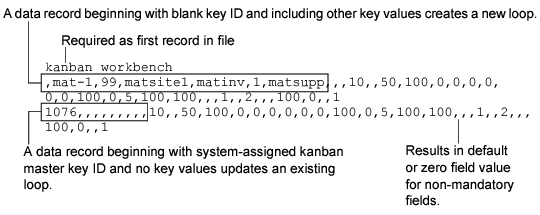
Kanban Item Master Maint Field | Source or Default | Notes |
Item | Import file: part | Validated against existing items defined in Item Master Maintenance |
Step | Import file: step | If not included in import file, set to 0 |
Routing Code | Blank | |
BOM Code | Blank | |
Container Type | Blank | |
Minimum Item EPEI | Import file: min_process_ item_epei | |
Cost Allocation | 100% | |
Average Inv Calc Method | Standard | |
Run-Out Option | No | |
Run-Out Setup | 0 00:00:00 | |
Run-Out Material | Blank | |
Run-Out Quantity | 0.0 | |
UM | Blank | |
Run-Out Quantity Per | 0.0 | |
Run-Out UM Conversion Factor | 0.0000 | |
Comments | No |
Kanban Supermarket Maint Field | Source or Default |
Description | Blank |
Location Type | Inv |
Inventory Location | Blank |
Comments | No |
Super Market Fax | Blank |
Supermarket Fax[2] | Blank |
Email | Blank |
Kanban Process Maint Field | Source or Default |
EPEI | Import file: epei_rev |
EPEI Auto | Import file: epei_auto_calc_rev |
Min EPEI | Import file: min_process_ epei |
Yield | 100% |
Mfg Seq # | 0 |
Cycle Time | 0 |
Setup Time | 0 |
Other Time Fields | 00:00:00 |
Kanban Master Maint Field | Source or Default | Notes |
Source Master Data frame | ||
Source Type | Import file: source_type | Must be either Supplier, Inv, or Process |
Supplier (when Source Type is Supplier) | Import file: source_ref1 | Must be valid supplier defined in defined in Supplier Create and completed in Supplier Data Maintenance |
Purchase Order (when Source Type is Supplier) | Import file: source_ref2 | If not blank, must be valid purchase order |
Line (when Source Type is Supplier) | Import file: source_ref3 | If not blank, must be valid line on specified purchase order |
Process Site (when Source Type is Process) | Import file: source_ref1 | Must be valid site |
Process ID (when Source Type is Process) | Import file: source_ref2 | Must be valid process ID |
Operation Range (when Source Type is Process) | 0–9999 | |
Use FIFO (when Source Type is Process) | No | |
Source Site (when Source Type is Inv) | Import file: source_ref1 | Must be valid site |
Supermarket (when Source Type is Inv) | Import file: source_ref2 | Must be valid supermarket; cannot be same site/supermarket combination as destination site/supermarket |
Supermarket Item Detail frames | ||
Order Point | Import file: order_point_ revised | Warning displays when this is not a multiple of Kanban Quantity |
Location Type | From Supermarket Maintenance for destination supermarket | Supermarket can already exist or be created by import |
Inventory Location | From Supermarket Maintenance for destination supermarket | Supermarket can already exist or be created by import |
Average Demand Template | Kanban Control | |
Working Buffer | 0 | |
Buffer Maximum | Import file: buffer_maximum_rev | Warning displays if value is less than Order Point or not a multiple of Kanban Quantity, Pack Quantity |
Buffer Modified | No | |
Limit Display | PCT | |
Critical Limit | 33 | |
Limit Modified | Blank | |
Warning Limit | 66 | |
Daily Demand | Import file: daily_demand_rev | |
Variability | Import file: var_factor_rev | |
Demand Modified | No | |
Demand Percent | Import file: replenishment_rev | |
Average Inv Calc Method | Standard | |
Pack Quantity | 1 | |
Package Type | Blank | |
Count Tolerance | 5 | |
Lag Factor | 0.0 | |
Safety Stock | Import file: safety_stock_rev | Warning displays if safety stock is more than Buffer Maximum or Order Point |
Safety Days | Import file: safety_days_rev | |
Service Level | 50% | |
Safety Stock Template | From Kanban Control | |
Safety Stock Method | Manual | |
Peak Average Days | 0 | |
SuperMarket Fax | From Supermarket Maintenance for destination supermarket | Supermarket can already exist or be created by import |
SuperMarket Fax [2] | From Supermarket Maintenance for destination supermarket | Supermarket can already exist or be created by import |
Email | From Supermarket Maintenance for destination supermarket | Supermarket can already exist or be created by import |
One/Two Card | One | |
Kanban Planner | Buyer/Planner field in Item Planning Maintenance record; if not found, same field in Item Master Maintenance; otherwise, blank | |
Carrier (when Source Type is Supplier) | From Supplier Data Maintenance | |
Carrier E-mail (when Source Type is Supplier) | From business relation linked in Carrier Maintenance | |
Card Tracking Control frames | ||
Order Quantity | Import file: order_qty_revised | Warning displays if this is not a multiple of Kanban Quantity |
Number of Cards | Import file: number_of_cards_rev | Warning displays if Number of Cards * Kanban quantity is not equal to Buffer Max |
Kanban Quantity | Import file: kanban_qty_rev | Warning displays if this is not greater than Container Capacity |
Container Capacity | 1 | Cannot be zero |
Container Type | From Kanban Item Master Maintenance | Kanban item can already exist or be created by import |
Print Quantity | From Kanban Control | |
Print Barcode (Item Number and Kanban ID) | From Kanban Control | |
User Reference | Blank | |
Ship Delivery Pattern Code | Blank | |
Point Of Use Location | Blank | |
Delivery Location | Blank | |
Order Quantity Multiple | Import file: order_qty_mult | |
Ship Delivery Time Code | Blank | |
Comments | No | |
Dispatch List | Yes | |
Fax Dispatch List | No | |
E-mail Dispatch List | No | |
Blanket PO Release | Yes when value in Purchase Order field represents a blanket PO; otherwise, No | |
Source Fax, Src Fax[2], Source E-mail | Varies by source type: • Supplier: from Supplier Create • Inv: from Supermarket Maintenance (existing or created by import) • Process: blank | |
Repl Time | Import file: replenishment_revised | |
FIFO Time Int | Import file: fifo_time_revised | |
Ext | Import file: fifo_ext_time_revised | |
Card Reporting | From Kanban Control | |
Fractional Kanban | From Kanban Control | |
Run Out Option | No | |
Accumulator Type | Quantity | |
Accum Interval | 0 | |
Next date | Blank | |
Next Time | 00.00.00 | |
Regenerate Required | No | |
Work Days (Sunday through Saturday) | No | All work times are set to 00:00:00. |
Kanban Transaction Control frame | ||
Regeneration Enforcement | From Kanban Control | |
Kanban Cycle Enforcement | From Kanban Control | |
Qty Violation Method | Round | |
Rounding Threshold | 100.00 | |
Minimum Cycle | From Kanban Control | |
Maximum Cycle | From Kanban Control | |
Decrease at Consume | From Kanban Control | |
PO Receipt Data Entry | From Kanban Control | |
Lot Entry | From Kanban Control | |
Component/Op Transactions | Yes when Source Type is Process and Destination supermarket’s location type is Inv; otherwise, No | |
Impact Inventory | No when: • Source Type is Process and destination supermarket’s location types is WIP • Source Type is Inv, destination supermarket’s location type is WIP, and source supermarket’s location type is WIP Otherwise, Yes | |
Use Control Prog Tran Settings | Yes | |