Calculate Average Demand and Safety Stock
Use the following programs to set up the system and calculate average demand and safety stock:
• Demand Calculation Template Maintenance (17.1.6)
• Demand Calculation Template Update (17.1.7)
• Average Demand Calculation (17.2.1)
• Safety Stock Calculation (17.2.2)
Defining Demand Templates
Before you can calculate average demand or safety stock, you need to define the number of days the system uses in the calculation.
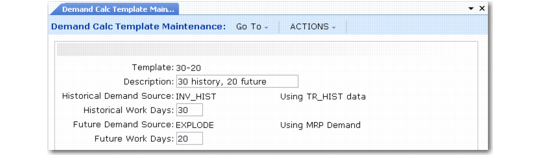
Use Demand Calculation Template Maintenance (17.1.6) to specify the number of days of historical and future demand the system uses when calculating average demand and safety stock.
Specify the template you want to use in Kanban Master Maintenance. That program uses default templates specified in Kanban Control (17.24), but you can change them for individual loops.
Use Demand Calculation Template Update (17.1.7) to update the average demand or safety stock template for multiple kanban loops at the same time. See
Updating Templates.
Note: For the same loop, you can use different templates for average demand and for safety stock.
Demand Calculation Template Maintenance (17.1.6)
In some manufacturing environments, historical demand usage is a good indicator of future demand for an item; in others, projected future requirements are better indicators of demand. You can define multiple templates with various combinations of historical and future days.
See
Average Demand for information on how the system uses historical and future days.
You can use any combination of historical and future days. To include only historical or only future days, leave the appropriate field set to 0 (zero). For example, to include only historical usage in the calculations, set Future Days to 0. To include only future projected requirements, set Historical Days to 0.
Note: The Historical Demand Source and Future Demand Source fields are display-only. The system currently has a single calculation of historical demand, and a single calculation of future demand:
• The historical demand calculation in the system uses the inventory history (tr_hist) records for determining past demand. The system searches the tr_hist file for any issue transactions that occurred during the specified period, totals them, and then computes a daily average.
• The effect of the future demand calculation in the system is the same as “quick deck” or summary BOM explosion: the system computes the average demand at the top of the bill of material using forecasts and customer orders, and then it explodes this average demand down through the bill of material. Some additional logic is provided at the component levels to add in any independent demand (forecasts and customer orders) when each component is processed.
Performing Calculations
After defining templates, use Average Demand Calculation (17.2.117.1) and Safety Stock Calculation (17.2.2) to calculate two types of planning data used in such activities as kanban sizing, supermarket setup, and level mix scheduling:
• Average demand is the average total quantity of a kanban item required during each day over a specified historical or future period. See
Average Demand.
• Safety stock is reserve inventory that guards against running out of stock during the time it takes to replenish a supermarket’s regular inventory. See
Safety Stock.
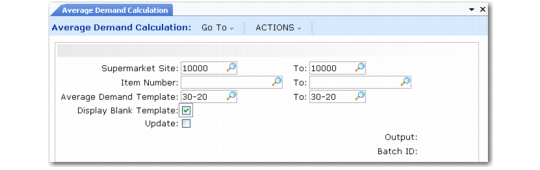
Average Demand Calculation (17.2.1)
To display loops that do not specify a template in Kanban Master Maintenance, set Display Blank Template to Yes. The output report from the program includes those loops, but no calculations are made. Previous and new values are the same.
Set Update to No to review a report of simulated results before updating the database. The report output shows both the previous and new average demand and safety stock for each kanban item within the site range, as well as various supermarket and kanban information.
When Update is Yes, the system modifies kanban loop and process records to include the recalculated data.
Note: The system also can update average demand and safety stock when you run the workbench programs or Historical Buffer Evaluation.
Updating Templates
Use Demand Calculation Template Update (17.1.7) to change the templates used in average demand or safety stock calculations for multiple kanban loops at the same time. A demand template, which is defined in Demand Calculation Template Maintenance, is a combination of numbers of historical and future days used to select demand records needed as the basis of system calculations.
You also can update those values for individual loops in Kanban Master Maintenance by manually changing the Average Demand Template or Safety Stock Template field.
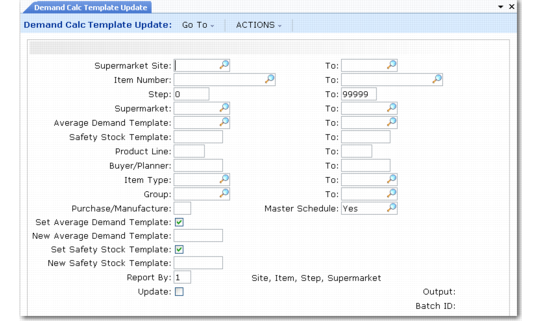
Demand Calculation Template Update (17.1.7)
Set selection criteria based on item master and kanban master data to select kanban loops. For example, you can limit the selection to loops that currently use a specified range of templates.
Use Set Average Demand Template and Set Safety Stock Template to determine which fields are updated. If you specify a new value, it must be defined in Demand Calculation Template Maintenance. To set blank template values for selected loops, leave New Average Demand Template or New Safety Stock Template blank.
To determine the effects of the selection criteria, run the program first with Update set to No to generate an audit report.