QAD 2017 Enterprise Edition
>
User Guides
>
Lean Manufacturing
>
Managing Kanban Cards
>
Create or Regenerate Cards
Create or Regenerate Cards
Use Kanban Card Create (17.3.12) to:
• Create kanban cards for a new loop that has been manually sized by entering the number of cards and quantity per card in Kanban Master Maintenance (17.1.4).
• Create cards for a loop that has been sized using the kanban workbenches.
Important: Although kanban sizing activities determine how many cards are needed to support a loop, the system does not actually create the cards. You must use this program to create them.
• Regenerate a new set of cards when loop information has been changed, making the information on the existing cards out of date.
• Add a limited-use card to a loop that has already had the required number of cards created, then use Kanban Card Maintenance (17.3.1) to set limited-use parameters.
Note: You also can use Kanban Multi-Card Maintenance (17.3.2) to create, define, and print one or more limited-use cards with a single application. See
Multiple-Card Maintenance.
In the initial frame, enter data to identify the loop for which cards will be created. You also can enter an item number and use next/previous processing to scroll through all the loops defined for the item. The system displays values from the Source Master Data frame in Kanban Master Maintenance.
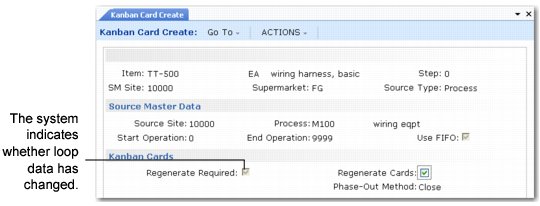
Kanban Card Create (17.3.12)
For loops that have already had cards created, the system determines whether cards need to be regenerated, depending on whether loop information has changed. Regenerate Required is set to Yes when the kanban quantity, source, bill of materials (BOM), or routing has changed.
The system displays the phase-out method specified in Kanban Control. When cards are regenerated, this determines whether the old cards are inactivated immediately or have their active status set to Close. See
Phase-Out Method.
Note: You can prevent the system from recording cards for loops that require regeneration using the Regeneration Enforcement setting in Kanban Master Maintenance. See
Regeneration Enforcement.
For new loops, the system displays the number of replenishment and move cards from Kanban Master Maintenance. These values are either entered manually or updated automatically based on calculations in the kanban workbenches or other programs that perform resizing.
After creating or regenerating cards, you can optionally print them using this program. Otherwise, you can use Kanban Card Print or Kanban Multi-Card Print.
Note: If you print cards using this program, the system prints all active cards for the loop that have not yet been printed—not just those created or regenerated in the current session.