QAD 2017 Enterprise Edition
>
User Guides
>
Master Data
>
Pricing
>
Using List/Discount Table Pricing
Using List/Discount Table Pricing
List/discount table pricing is used for pricing different kinds of orders other than best pricing, including customer and supplier scheduled orders, purchase orders, and receipts in RMA Maintenance (11.7.1.1).
Each item has a base price expressed in base currency. Price lists are used to store other pricing structures, such as prices in other currencies, prices or discounts for a certain unit of measure, such as a case or full truckload, discounts at different quantity levels, or prices calculated as a percentage markup over GL cost.
Price Lists with Overlapping Dates
When you create, copy, or generate a price list that has the same item, product line, currency, unit of measure, and overlapping dates with an existing price list of the same class (supplier or customer), the system can do any of the following, depending upon how you set start and end dates:
• Expire an existing price list
• Move the start date of an existing price list when you copy or generate a price list.
• Prohibit the copy, creation, or generation of a price list
Note: The system does not consider the amount type when determining overlapping dates.
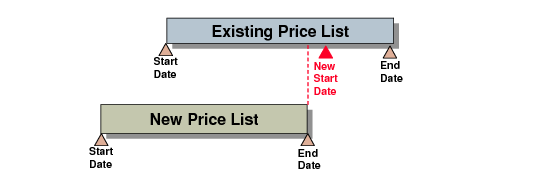
When you copy or generate a price list and the new price list has a start date that is before an existing price list start date and an end date that is earlier than an existing price list end date, the system automatically moves the start date of the existing price list to one day after the end date of the price list you are creating; see
Moving Start and End Dates, Example 1.
Note: You cannot create a new price list in the maintenance programs when dates overlap in this manner.
Moving Start and End Dates, Example 1
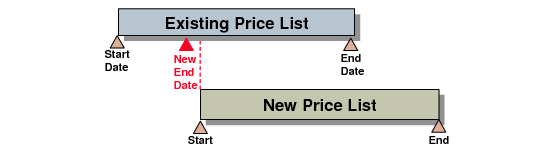
If you copy or generate a price list and the new price list has a start date that is later than the start date of an existing price list, the system automatically expires the existing price list by moving the end date to one day before the start date of the new price list; see
Moving Start and End Dates, Example 2. For this type of overlapping dates, the system prompts you to expire the existing price list in maintenance programs, rather than automatically expire.
Moving Start and End Dates, Example 2
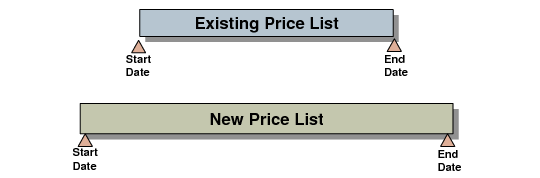
You cannot copy, create, or generate a price list that has a date range that completely surrounds or spans an existing price list date range; see
Date Range Not Allowed, Example 1. If you try, the system displays an error message. However, you can copy, create, or generate a price list that is within the date range of an existing price list; in this case, the system expires the existing price list.
Date Range Not Allowed,
Example 1
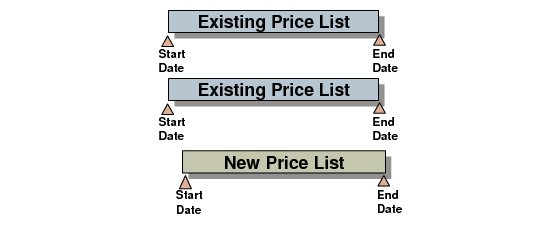
Also, you cannot copy, create, or generate a price list if dates overlap with more than one existing price list of the same criteria; see
Date Range Not Allowed, Example 2
Date Range Not Allowed,
Example 2
Price lists that have identical criteria, including one or both dates, but different names are not overlapping price lists. For example you may have two price lists with identical criteria and dates but different names for different suppliers.
Price List Reclassification (1.10.24) displays date validation data in the Message field of the utility reports after you initially run the utility to classify price lists.