Price List Maintenance Programs
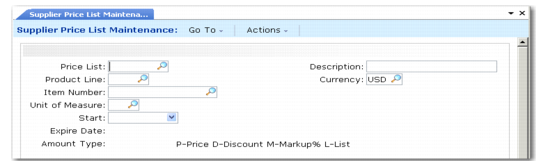
Supplier Price List Maintenance (1.10.2.1) shows the Supplier Price List Maintenance screen. Field descriptions follow the figure. Fields for Cust Schedule Price List Maint are the same.
Supplier Price List Maintenance (1.10.2.1)
Price List
Enter a code that identifies a pricing structure that defines specific prices, discounts, and markups at different quantity levels.
Type P: Price discount tables can be stated in terms of the domain base currency or any other currency.
Type D: Discount percent prices are discounted from the item list or base price.
Type M: Markup percent prices are percentages added to the item GL cost.
Type L: List price lists enable you to define a base price for the item, rather than using Item Master Maintenance. List type price lists let you enter price changes before their introduction, thus providing a history of an item’s price using the Start and Expire dates. You can also set minimum and maximum acceptable prices to use with discount tables to keep the item’s price within a certain range.
Note: You cannot enter type L price lists in Cust Schedule Price List Maint (1.10.3.1).
Suppliers can be assigned both a price table (L type price lists) and a discount table (D, M, or P type price lists). The prices derived from these tables can be changed on individual order lines.
Description
Optionally enter a description of the price list.
Product Line
Enter the product line associated with this price structure. This field can be left blank. Since each item in the system belongs to a product line, pricing by product line lets you set up price structures for a group of items so that you do not have to enter them individually.
Currency
Specifies the currency of the transactions that are subject to this price list. A price list is used only if the currency of the transaction is the same as the price list currency.
Item Number
Enter an item number if this price applies only to this item. Leave blank to set up price structures by product line or for all items.
Price lists by item are often used to set up foreign currency prices, enabling you to enter a specific base price for an item stated in terms of another currency. This also lets you define different prices at each site. Item prices are also used if you offer special pricing to a customer for only one or a few items, whether specific prices, discounts, or markups.
Supplier Price List by Item Rept (1.10.2.4) and Cust Schedule Price List by Item Rept (1.10.3.4) produce a printed list of item pricing.
UM
Enter the unit of measure associated with this price list structure. This field can be left blank if the pricing applies to any unit of measure. Unit of measure is useful for defining special prices based on the unit of measure of the transaction.
Start
Enter the first date to use for this price structure. You cannot leave this field blank.
You cannot create a price list with dates that fall outside of a current price list date range if the current price list has the same item, currency, product line, and unit of measure.
When determining which price list to use, the system compares the transaction date with the price list start and expiration dates. If the transaction date falls on or between these dates, the system selects the price list with the latest start date that has not expired.
Start and expiration dates are useful for phasing in price changes. For example, if you set pricing on a yearly basis, always set the start date to January 1 and the expire date to December 31. Starting the next year, old prices are automatically phased out and new prices used.
Expire
Enter the last date to use for this price structure. You cannot leave this field blank.
If you enter a date that is the same as that for an existing supplier price list with an overlapping same start date and the same item, currency, product line, and unit of measure, the system prompts you to expire the existing price list. If you specify No, you cannot continue. If you specify Yes, the system changes the expiration date on the existing price list to one day before the start date of the price list you are creating.
Amount Type (L/P/D/M)
Specify whether the price list is a list price table or discount table:
L: List price table
P: Discount table (net price)
D: Discount table (discount %)
M: Discount table (markup %)
Note: You cannot enter a type L in Cust Schedule Price List Maint (1.10.3.1).
The amount type determines which fields display in the next frame. For all amount types, the system displays the following read-only fields:
Item Master List Price
The system displays the price for one unit of the item, using the item stocking unit of measure, at the item’s default site.
Total This Level GL Cost
The system displays the total GL cost for the item’s default site. It includes all cost elements for this level and lower levels.
Total GL Cost
The system displays the default purchase price. It includes this‑level costs, excluding any overhead cost elements.
For lists with amount type L, enter the following:
Price Table List Price
Enter the price or cost for one unit of the item, using the price table unit of measure. This price overrides the item master list price or cost.
Minimum Price/Maximum Price
A range of acceptable values for the line item net price/cost (list price/cost minus any discounts). If the line item net price/cost is outside this range, the system displays an error message.
For lists with amount type P, D, or M, enter a set of minimum quantities and the corresponding price, discount percentage, or markup percentage.