Generating Price Lists by Item
After defining item prices in the item master, you can create supplier price tables automatically using Supplier Price List Gen by Item (1.10.2.6). You can create supplier price tables from item master prices, and you can create prices for one or a range of items and product lines.
Supplier Price List Gen by Item uses only item master list price, not item cost, to calculate the new list price. For supplier price lists, the system creates only type L price lists, using the default item stocking UM as the price list UM. Once the lists are created, use the supplier price list maintenance program to add minimum/maximum prices and change prices.
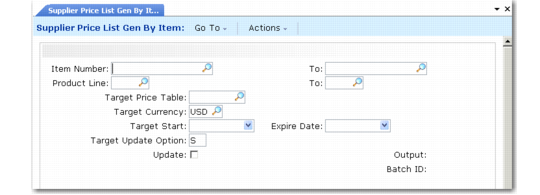
Supplier Price List Gen by Item (1.10.2.6) shows the Supplier Price List Gen by Item screen. Field descriptions follow the figure.
Supplier Price List Gen by Item (1.10.2.6)
Item Number/To
Enter a range of item numbers for which price tables are to be created.
Prod Line/To
Enter a range of product lines for which price tables are to be created.
Target Price Table
Assign a price list code to the price tables being created.
Target Currency
Assign a currency code to the price tables being created.
Start
Assign a start date to the price tables being created. You cannot leave this field blank.
You cannot generate a price list with dates that fall expand a current price list date range if the current price list has the same item, currency, product line, and unit of measure.
Expire Date
Assign an expiration date for the price tables being created. You cannot leave this field blank. The system applies this field differently in different situations if the target price list is of the same type as an existing price list for the same item, currency, product line, unit of measure, and dates overlap:
• If the target price list has a start date that is earlier than an existing price list start date and an end date that is earlier than an existing price list end date, the system automatically moves the start date of the existing price list to one day after the target end date. See
Price Lists with Overlapping Dates.
• If the target price list has a start date that is later than an existing price list start date and earlier than the expire date, the system automatically expires the existing price list by moving the existing price list expire date to one day before the target price list start date.
• If the target list has a date range that completely surrounds or spans an existing price list date range, you cannot generate the list. See
here.
Target Update Option
Enter one of the following values that determines how the system handles items that already have a target price list.
Skip (the default): Skips the item and does not create a price table for it.
Clear: Deletes the existing Type L price list and creates a new Type L price list.
Expire: Creates a new target price list and sets the expire date of the existing Type L price list to either the:
• Start date minus one day of the date specified in Start Date
• Start date plus one after the date specified in Expire Date
Update
If No, the system prints a simulated transaction report. If Yes, the system creates the target price tables.