Copying Price Lists
Use Supplier Price List Copy (1.10.2.5) to quickly create alternate price lists for suppliers from one base price list and automatically recalculate prices based on the Cur Conv Factor. Use Cust Schedule Price List Copy (1.10.3.5) to do the same for customer price lists. You can also adjust existing price lists by increasing or decreasing prices with an adjustment percent.
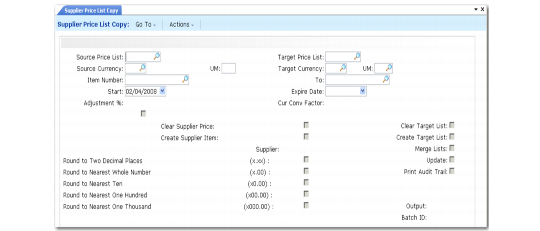
Price List Copy (1.10.2.5) shows the Supplier Price List Copy screen. Field descriptions follow the figure. Fields for Cust Schedule Price List Copy are the same, except for the following:
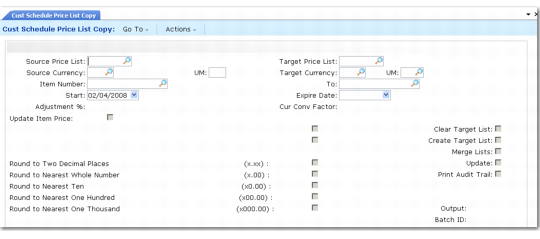
• Cust Schedule Price List Copy does not have Clear Supplier Price, Create Supplier Price, and the Supplier fields.
• Supplier Price List Copy does not have an Update Item Price field.
Price List Copy (1.10.2.5)
Source Price List
Enter a valid price list code to be used as the source of the data copied to the target price list.
Target Price List
Enter the code to be used as the destination of the copy. Target and source can be the same; however, the system can change dates or prohibit copying when dates overlap. See
Price Lists with Overlapping Dates.
Source Currency
Enter the currency of the prices being copied. Pricing information and currency rate from the source price list are copied to the target price list for the range of item numbers specified.
UM
Enter the unit of measure for the item for the source price list. You define the unit of measure in Unit of Measure Maintenance.
Target Currency
Enter the currency for the system to use on the target prices. The source and target currency can be the same—leave blank for the system to default to the source currency. If you are copying from one currency to another, the system calculates and a default Cur Conv Factor using the exchange rate effective on the price list start date. The system adjusts prices on the target list using the conversion factor you specify.
UM
Enter the unit of measure for the item for the target price list. You define the unit of measure in Unit of Measure Maintenance.
Item Number/To
Enter a range of item numbers to be used as selection criteria in choosing prices to be copied.
Start
Enter the start date for the new pricing structure created by the copy. The default is today’s date.
Expire Date
Enter the expiration date as the end effective date for the target price list. The system applies this field differently in different situations if the source and target price list have the same currency, product line, and unit of measure and dates overlap:
• If the target price list has a start date that is earlier than the source price list start date and an end date that is earlier than the source price list end date, the system automatically moves the start date of the source price list to one day after the target end date. See
Price Lists with Overlapping Dates.
• If the target price list has a start date that is later than the source price list start date and earlier than the source price list expire date, the system automatically expires the existing price list by moving the source expire date to one day before the target price list start date.
• If the target list has a date range that completely surrounds or spans an existing source list date range, you cannot generate the list. See
here.
Adjustment %
Specify the adjustment percentage by which prices (Amount Type P) are multiplied, then rounded to the specified number of decimal places. The default is 100%. Discount and markup percentages (Amount Type D and M) are also multiplied by the adjustment percent. If the percentage is greater than 100%, amounts are increased. If the percentage is less than 100%, amounts are decreased.
Cur Conv Factor
Enter a conversion factor to use when the source and target price list currencies are not the same. The system calculates and displays a default Cur Conv Factor using the exchange rate in effect on the price list start date. If effective exchange rates are not found, Cur Conv Factor defaults to 1. You can modify the conversion factor, if needed. However, the value cannot be 0.
Clear Supplier Price
Indicate if supplier prices are cleared before copying in the new prices.
No (the default): Prices are added to the existing supplier-item prices.
Yes: Existing supplier-item prices are cleared and the new prices are added.
Supplier Price List Copy can be used to create supplier-item quotes. Cust Schedule Price List Copy can be used to create customer-item quotes. When Create Supplier Item is Yes, you are prompted to enter a supplier. All adjusted prices are calculated and copied into supplier-item records as the Quote Cost for that supplier. Quote prices are accessed by purchasing to display the current price quoted by a supplier. Other supplier-item information is also available but must be adjusted manually.
Clear Target List
Indicate if the target price list should be cleared before copying the new prices.
No (the default): The system adds the prices to the existing target price list.
Yes: The system clears the target price list first and then copies the new prices.
Update Item Price
Indicate if the item base price should be adjusted during this process.
No (the default): Item base prices are not affected.
Yes: The base price for the item is set to the target price. Two other conditions must be true: the source price list must have a P or L amount type, and the target price list currency must be the base currency. Each item number on the price list is updated with the first price on the price list.
Create Supplier Item
Indicate whether the system creates a supplier price list if it does not exist. If this is Yes, a new price is created if one does not exist. If this is No, a list is not created. If Create Supplier Item is Yes and the price exists, the value of Clear Supplier Price determines if the price is cleared before the copy, or if an end effective date is added to the old price.
Create Target List
Indicate if the supplier item price does not exist, it should be created.
No: A new price list is not created.
Yes (the default): A new price is created if one does not exist. The system copies the price list by expiration date and unit of measure that matches the list name, currency, and unit of measure. If the source is an amount type M, the target is also a type M.
If Create Supplier Item is Yes and the price exists, the value of Clear Supplier Price determines if the price is cleared before the copy.
Supplier
Enter the supplier for whom you want to update item quotations.
The price list copy function can be used to create supplier-item quotes. When Create Supplier Item is set to Yes, you are prompted to enter a supplier code. All adjusted prices are calculated and copied into the Supplier Item table as the Quote Cost for that supplier.
When Clear Supplier Price is No, the system adds the quote prices into the existing supplier item table. When it is Yes, the system clears the data and then copies in the new prices.
Quote prices are accessed by purchasing, to display the current price quoted by a supplier. Other supplier-item information is also available but must be adjusted manually--Quote Qty and Lead Time.
Round to Two Decimal Places, Round to Nearest Whole Number, Round to Nearest Ten, Round to Nearest One Hundred, Round to Nearest One Thousand
Set only one of these to Yes, indicating the rounding method to be used when creating the new price list structure.
Update
Indicate if the target price list is actually updated based on the parameters specified. It is recommended that you set Update to No and Print Audit Trail to Yes to create a report of potential changes before they are made. This lets you review changes before actually creating or updating the target price.
No (the default): A report runs but the update does not occur.
Yes: Target price lists are updated based upon the parameters you set.
Print Audit Trail
Defaults to No. Indicates if an audit report should be printed. If Yes, a report prints showing the effect of applying the copy parameters to the target price list. If No, a report does not print.
Cust Schedule Price List Copy (1.10.3.5)