Maintaining Item Records
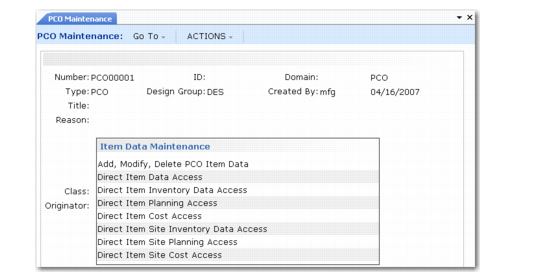
Select Item Data Maintenance to enter changes in item master data. You can make changes in the following item and item-site data:
• Inventory
• Planning
• Cost
Multiple selections are provided on the menu.
PCO Maintenance (1.9.2.13), Item Data Frame
Add, Modify, Delete PCO Item Data enables you to change item master data fields for an existing item. Standard validation prevents the same item master from being changed by more than one undistributed PCO. Only data specified with Item Data Maintenance (1.4.3) can be modified.
Note: You cannot add new item numbers with this function.
Each of the functions that begin with Direct let you run the equivalent function on the item menu. These functions directly affect production records; updates are made in item master and item-site detail tables, not in the PCO tables.
For example, Direct Item Data Access is the equivalent of invoking Item Data Maintenance (1.4.3) and enables you to add a new item number, enter item master data, and enter item-site data directly into the production database.
Direct Item Data Functions
Direct Item and Item-Site Programs Accessed lists the program that you call when you invoke the direct item access functions. If security options are set for the programs, PCC applies the security options, also.
Direct Item and Item-Site Programs Accessed
PCO/PCR Item Data Maintenance Menu Option | Accessed Program | Menu Number |
Direct Item Data Access | Item Data Maintenance | 1.4.3 |
Direct Item Inventory Data Access | Item Inventory Data Maintenance | 1.4.5 |
Direct Item Planning Access | Item Planning Maintenance | 1.4.7 |
Direct Item Cost Access | Item Cost Maintenance | 1.4.9 |
Direct Item Site Inventory Data Access | Item-Site Inventory Data Maint | 1.4.16 |
Direct Item Site Planning Access | Item-Site Planning Maintenance | 1.4.17 |
Direct Item Site Cost Access | Item-Site Cost Maintenance | 1.4.18 |
With these functions, item numbers can be created in production environment rather than in the engineering work space, since important functions may require that they exist before the PCO is released. Impact analysis and the creation of a quotation request are examples of functions that depend on the existence of item numbers.
Add, Modify, Delete PCO Item Data
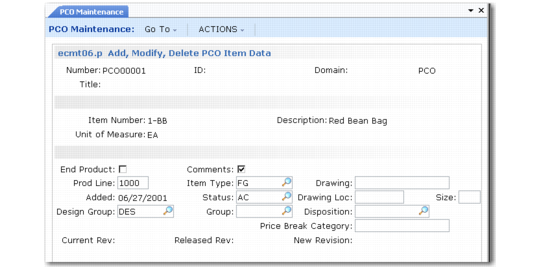
Add, Modify, Delete PCO Item Data illustrates the screen that displays when you select Add, Modify, Delete PCO Item Data.
Add, Modify, Delete PCO Item Data
Key fields in the program are as follows.
End Product
Indicate if this item is the end product affected by the PCO. Often, PCO details apply to low-level components that are affect higher-level items. This field is for reference only.
Comments
Enter Yes to attach comments regarding the change.
New Revision
Enter a revision level indicator for the item. The item’s revision level is updated when the PCO is implemented. Revision levels are alphanumeric codes such as 1b, aa, B3, c.34, 6q3. To use strictly numeric values, fill the number with zeros (0001, 0002, and so on). Revision levels can be skipped, but cannot be specified in descending sequence.
The New Revision value must be greater than the Released Rev value, which shows the revision level of the most recently released PCO affecting the item.
Status
New items created for a PCO can be given an item status that prevents their use in live transactions. The status field on the PCO can be set so that at implementation the restricted status is replaced with an active one.