Maintaining Product Structure Records
To use these functions, Product Structures must be Yes in Enable PCC Structure Maintenance (13.13.22). Otherwise, Structure Data Maintenance is not available from the Select PCR/PCO Section submenu.
Select Structure Data Maintenance to copy or deactivate product structures, add items to product structures, or replace product structure components. You can also create a new product structure by copying an existing one, renaming it, then optionally modifying it. Formula-controlled items must be updated in Formula Data Maintenance.
Another submenu offers six selections:
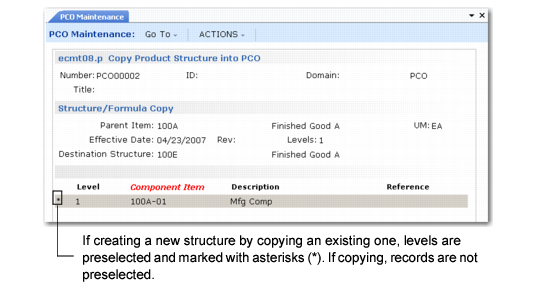
• Copy Product Structure into PCO. Copies or creates new product structures into the PCO to serve as a basis for further modification. You can optionally specify the product structure level to copy. You can create new product structures by copying existing ones from production or from within PCC, renaming them, then optionally modifying them. If you copy a product structure and specify 0 (zero) for levels, the system copies all levels. Copied product structures contain the same field values as production records.
Note: To attach comments to changes made with these functions, set Comments to Yes.
To copy the parent item from production, accept the default parent item in Destination Structure. To copy an existing parent item from production or PCC into a new structure, enter a new structure name in Destination Structure. See
Copy Existing Product Structure to a New One.
Newly created structures do not exist outside of the PCC module until the PCO is incorporated/implemented. The release of the PCO triggers other activities, such as routing and product structure cost roll-ups.
Copy Existing Product Structure to a New One
• Copy Where Used into PCO. Works the same as Copy Product Structure into PCO, except it displays an indented where-used bill of material screen, and lets you select product structure records to copy into the PCO. This is useful if you are making the same change to several product structures.
• PCR/PCO Detail Maintenance – Product Structures. Used for adding items to product structures, deactivating product structure records, and editing product structure changes already added to the PCO. Records are not actually deleted. Deactivating a record sets an ending effective date when the PCO is incorporated.
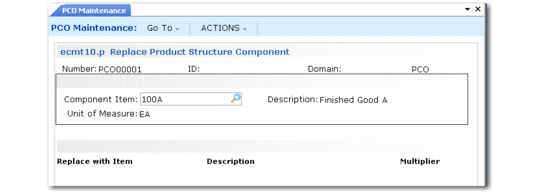
• Replace Product Structure Component. Used in conjunction with other PCO functions to replace one component item with another across multiple bills of material.
Enter an existing component item number followed by a new one. The system accesses product structure records already included in the PCO, searching for occurrences of the requested component. It marks these product structures Deactivated (end effective date set) and adds new product structures for the same parent items, substituting the new component for the old one.
Replace Product Structure Component
• Copy Product Structure Within PCO. This option is the same as Copy Product Structure into PCO, except that it starts from a product structure within the current PCO and lets you create similar ones.
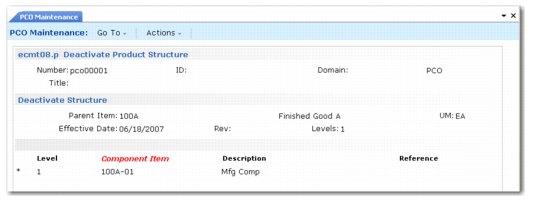
• Deactivate Product Structure. Deactivates the product structure you specify in the Parent Item field. You can deactivate the parent item for level 1 only. The system displays a second frame with preselected structure content. Deselect records you do not want to deactivate.
Multiplier
Modifies the Qty Per value for the new component. The quantity per of the old component is multiplied by this number to determine the quantity per for the new component. As an example, an old component has a quantity per of 2. The multiplier is set to 0.5. The quantity per for the new component is 1.
Other detailed product structure data, such as Scrap % and Op, are copied from the existing record, although you can use other PCO Maintenance functions to change them.
To replace one component item with another across all bills of material, create a PCO and use Copy Where-Used into PCO to include every product structure record that used the old component. Then, use Replace Product Structure Component to deactivate the existing product structure records and add new ones that specify the new component. In this way, you can set up mass component maintenance on a PCO in two relatively simple steps.
Deactivate Product Structure