Maintaining Routing Records
Important: To use these functions, Routings must be Yes in Enable PCC Routing Maintenance (14.22).
Select Routing Data Maintenance to copy, create a new, or deactivate routings and operations or to make additions, changes, and removals to both standard and rate-based routings. You can create a new routing by copying an existing one from production or from within PCC to a new name and then optionally modifying it. To modify processes, use Process Data Maintenance.
The Routing Data Maintenance submenu has the following selections:
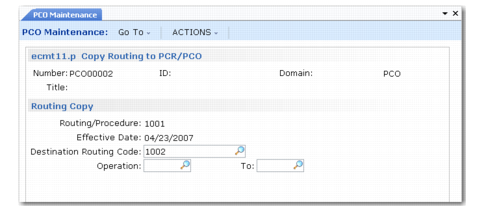
• Copy Routing to PCR/PCO. Copies routing records into the PCO. Displays the operation for a routing and enables you to select any number of steps for inclusion in the PCO. Once copied, operations can be modified with Detail Maintenance.
To copy a routing from production, specify the source in the Routing/Procedure field, then accept the default routing in Destination Routing Code. To create a new routing from an existing one, copy the routing from production or PCC into a new routing, enter a new name in Destination Routing Code. See
Copy Routing into PCO.
The destination routing does not have to exist or be a valid item number. If it does exist in the production system and has operations, a warning displays. If you continue, existing operations are not overwritten. Any source operation numbers that do not exist in the destination are added, merging the two sets of operations.
Copy Routing into PCO
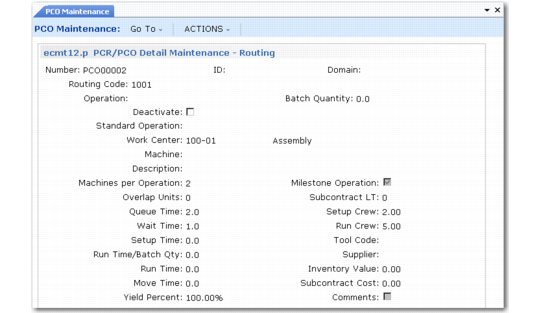
• PCR/PRO Detail Maintenance – Routing. Used to add operations to a routing, deactivate operation steps, and edit routing changes already added to a PCO. Records are not actually deleted. Deactivating a record sets an ending effective date when the PCO is incorporated.
PCR/PRO Detail Maintenance – Routing
• PCR/PRO Detail Maintenance – Routing (Rate Based). Works just like Add/Edit/Deactivate Routing, except for differences in maintained data fields. The differences are the same as those between standard Routing Maintenance (14.13.1) and Routing Maintenance (Rate Based) (14.13.2).
• Copy Routing Within PCO. This option is the same as Copy Routing to PCR/PCO, except that it starts from a routing within the current PCO and lets you select operations to copy into another routing within this PCO. This is useful if you are making the same change to several routings.
• Deactivate Routing. Deactivates routings and operations. The system displays a second frame with preselected operations. Deselect operations you do not want to deactivate.