Inventory Attribute Active Field
You can override inventory status and other attribute information for an item during receipt, except when the status or other attribute conflicts with existing items with the same lot and reference number at a location. When this occurs, an error displays and you have two choices:
• Change the site, location, lot, and reference to identify a different inventory location.
• Change the Active field of the inventory status or other attribute to No. The system then uses the attribute of the already existing inventory detail record.
Overriding Default Attributes
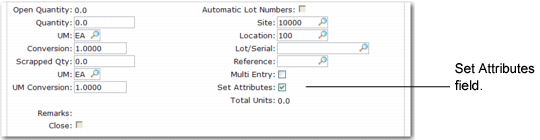
To override attributes at receipt, set the Set Attributes field to Yes in Work Order Receipt (16.11), Work Order Operation Backflush (16.19), Purchase Order Receipts (5.13.1), Repetitive Labor Transaction (18.14), Backflush Transaction (18.22.13) and Move Transaction (18.22.19) in Advanced Repetitive, or RTS Receipts (11.7.3.13).
Set Attributes Field in Work Order Receipt (16.11)
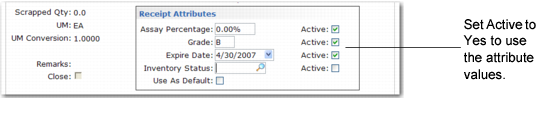
A pop-up window displays the current attribute settings.
Receipt Attributes Pop-Up
Change attributes as needed and choose Yes in the associated Active field to use your selections.
• Choose Yes in the Use As Default field to assign the entered attributes as defaults for the current order. All future receipts to the same order will have the specified attributes.
• Choose No in all of the Active fields and choose Yes in the Use As Default field to clear the default values. All attribute values are set to blank for this order.
• If inventory exists for a location, lot, and reference combination with attributes that are different from the ones on this order, an error message displays. Choose No in the Active fields of the conflicting attributes to correct the error.
Active Fields and Blank Inventory Status
Active fields enable you to enter a blank for a valid inventory status. For example, if the PO Rcpt Status field is blank, the system cannot determine whether you want to assign a blank status code, or if you want to accept a default setting previously assigned to an item, location, or site. The Active field solves this problem. If the Status field is blank and Active is Yes, then a blank status is assigned. Otherwise, if the Status field is blank and Active is No, the system assigns the status based on another default, as described in
Attribute Search Order.
Attribute Order of Precedence
Attribute Search Order shows the search order the system uses to determine default inventory attributes during receipt. If values have not been defined in any of these programs, the default attribute is blank.
Attribute Search Order
Order of Precedence | Location of Inventory Status Values | Menu Number | Field Name | Active |
1 | Work Order Maintenance Work Order Attribute Maintenance | 16.1 1.22.4 | Receipt Status Receipt Status | Yes Yes |
2 | Item-Site Inventory Data Maintenance | 1.4.16 | PO Rcpt Status WO Rcpt Status | Yes Yes |
3 | Item Master Maintenance | 1.4.1 | PO Rcpt Status WO Rcpt Status | Yes Yes |
4 | Inventory Detail Maintenance | 3.1.1 | Inventory Status | N/A |
5 | Location Maintenance | 1.1.18 | Inventory Status | N/A |
6 | Site Maintenance | 1.1.13 | Inventory Status | N/A |
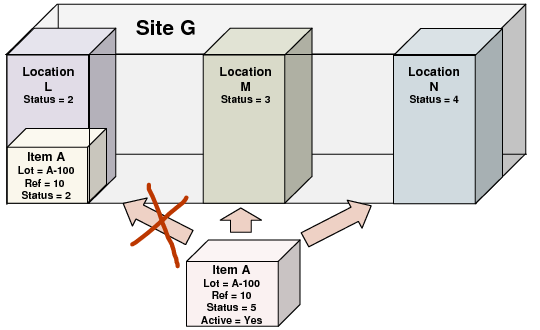
Inventory Status Example illustrates how these rules can be applied. In this example, assume that all of the items are in the same lot and have the same reference number.
Item A, which has a default inventory status of 5, cannot be received into Location L. This is because the same item already exists in this location with the same lot and reference numbers and a different status. Item A can be received into Locations M or N with a status of 5, since neither of these locations contains inventory with the same lot or reference number as the items being received.
If Item A’s Active field were No, it could be received into Locations L, M, or N. In this case, Item A’s status would change to the default status for the location—2 for Location L, 3 for Location M, 4 for Location N.
Inventory Status Example