Defining Logistics Charge Codes
Use Logistics Charge Code Maintenance (2.15.1) to define codes for each logistics charge incurred and payable to a third-party supplier when purchasing or shipping items. These accounts default from Logistics Operational Accounting Control, but you can change them.
A logistics charge code can be used for inbound charges, outbound charges, or both. There is nothing to indicate whether a logistics charge code is used for outbound or inbound purposes. When an inbound and outbound charge is managed differently, define two separate codes.
Inbound Logistics Charges
Inbound logistics charges can include freight, duty, insurance, and so on. You can indicate whether an inbound logistics charge is taxable and assign default tax parameters.
To accrue inbound logistics charges and include them in the cost of purchased items, you must associate a separate cost element with each logistics charge code used for inbound purposes. When modifying the cost element, you may also specify PO price variance account and AP rate variance account information. You cannot assign the same cost element to more than one logistics charge. See
Creating Logistics Cost Elements for details on cost elements.
For example, you create a cost element named Freight and assign it to the Freight logistics charge code. You cannot assign the Freight cost element to any other logistics charge code. If you want to track different types of freight, such as domestic and overseas, you must create a cost element for each logistics charge code.
Outbound Logistics Charges
Outbound logistics charges include the cost of freight only. These are charges paid to third-party carriers when items are shipped to a customer or another company location.
You do not need to define tax parameters since outbound freight charges use the tax parameters from the trailer code associated with the freight charge on the order or shipment. You can track outbound charges for sales orders and distribution orders using separate sets of accounts.
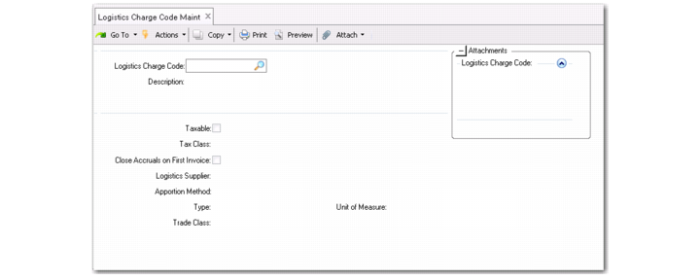
Logistics Charge Code Maintenance (2.15.1)
Logistics Charge Code
Enter an 8-character code identifying a logistics charge. This code can be used for both inbound and outbound logistics charges.
Description
Enter a brief (24 characters) description for this logistics charge.
Taxable
Indicate whether this logistics charge is taxable. This field applies when the charge code is used for inbound purposes. Outbound freight charges use the tax parameters associated with the freight charge on the order or shipment.
Tax Class
Enter the tax class used for an inbound taxable logistics charge.
Close Accruals on First Invoice
Enter the default setting for the Finished field in the pop-up window in the Logistic Charge tab of Receiver Matching Create. You can override the default in the Logistic Charge pop-up window.
No: If you might receive multiple invoices for this charge, set this field to No. For example, a freight charge may include one invoice for overseas shipping and another for transportation from the dock to your warehouse.
Yes: If you typically receive a single invoice for this logistics charge, set this field to Yes.
Logistics Supplier
Optionally enter a default logistics supplier for this logistics charge.
Apportion Method
Specify the apportioning method to use when matching an invoice for this logistics charge. See
Apportioning Logistics Charges.
When an invoice is received from a logistics supplier, the total amount of the invoice is matched. To capture the logistics costs for individual line items, a portion of the total invoice amount is allocated to each line item on the order. To determine the apportion value for each line item, the line item accrual value is divided by the total accrual value for the order, then multiplied by the total invoice amount.
• 1: Apportion by the accrued value (default)
• 2: Weight
• 3: Volume
• 4: Price
The default, system-defined apportion method is identified with code 01.
Type
Specify the item type (unit or bulk).
Note: Specify item type to determine how the logistics charge amount is calculated. If it is a fixed amount per delivery, choose “bulk.” For variable amounts by quantity, choose “unit.”
Unit of Measure
Specify the unit of measure.
Trade Class
If necessary, specify the trade class. See
Trade Zones and Trade Environments.
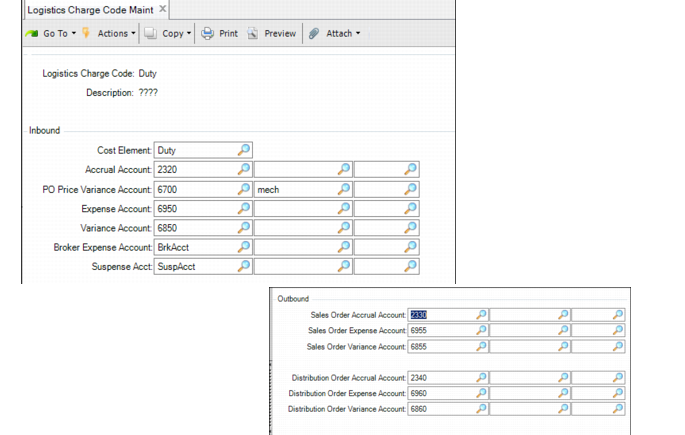
Logistics Charge Code Maint, Inbound and Outbound Frames
Cost Element
Optionally enter a cost element to associate with this logistics charge. The system uses the values in this cost element when accruing inbound logistics charges for individual items. See
Creating Logistics Cost Elements for details.
Define accrual, expense, and variance accounts for this logistics charge code. These accounts are used as the defaults when you define detailed accounts in Inbound Account Maintenance (2.15.13), Outbound Accrual Account Maintenance (2.15.16), and Outbound Expense Account Maintenance (2.15.19).