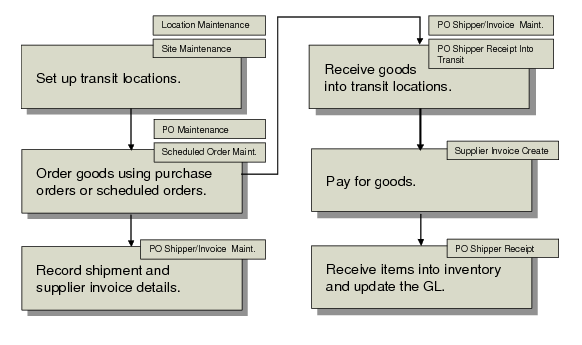
Tracking Shipments and Paying for Goods-In-Transit
Typically, a company creates a purchase order and sends it to the item supplier. The supplier may be local or may be in another country. The supplier ships the goods to a company location where the customer receives the goods. Depending on the contract terms, ownership, risk, and liability for the goods may transfer to the customer when the goods are shipped or when the goods arrive at their destination. When ownership is transferred, the supplier prints a sales invoice and sends it to the customer who then begins the process to pay the supplier.
When the transit time for purchased goods takes place over an extended period of time—such as goods shipped by sea between continents—the customer ordering the goods is typically responsible for organizing the shipment of the goods through a third-party freight company. Since the item supplier is not responsible for delivering the goods to the customer, the supplier expects payment as soon as the goods are collected from their premises. The item supplier sends an invoice to the customer, which must be paid before the goods physically arrive at their destination.
In this situation, the system lets you receive goods into transit locations and process payment for those goods while they are still in transit.
Overview of Importing Activities
Setting Up Transit Locations
Use Location Maintenance (1.1.18) to create a transit inventory location. This location does not represent a physical location where goods are stored. Rather, it is used to track all items on PO shippers that are currently in transit to your company, letting you record the liability for the items and process payment for supplier invoices before the goods physically arrive.
Ensure that the inventory status code assigned to this location is set to not available (the goods are still in transit) and not nettable. Otherwise, MRP considers the supply in that location twice: once for the scheduled receipt and again for the nettable quantity in the location. Use Inventory Status Code Maintenance (1.1.1) to create a code that sets inventory status to not available and not nettable. You can also restrict transactions to prevent the inadvertent issue of inventory from the transit location by other programs.
After a transit location is created, assign it to a site using Site Maintenance (1.1.13). One transit location is used to track all purchased goods currently in transit to the specified site. Inventory is received into this location by PO Shipper Receipt Into Transit (5.13.19) or PO Shipper/Invoice Maintenance (5.13.18) and transferred out of this location by PO Shipper Receipt (5.13.20).
Note: It is recommended that you use Inventory Account Maintenance (1.2.13) to specify an inventory account for the transit location so that goods in transit are tracked separately in the GL from goods that have actually been received.
PO Shippers Combined with Supplier Invoices
Use PO Shipper/Invoice Maintenance (5.13.18) to create a single record that combines shipment details with supplier invoice details, record the associated inbound logistics charges, and receive goods into a transit inventory location.
Shipper/invoices support companies where:
• The shipment of purchased items requires an extended transit time.
• The company is responsible for organizing the shipment of goods from an item supplier.
• Item suppliers expect payment for their goods before they arrive at the ship-to destination.
You can continue to add new supplier invoices to an existing shipper/invoice and receive the associated PO line items into the transit location. Items received into a transit location cannot be updated.
After shipment information, supplier invoice details, and PO line items are recorded, the system prompts for additional logistics accounting and transit information. The logistics accounting detail frame is the same as PO Shipper Maintenance shown in
PO Shipper Maintenance, Logistics Accounting Detail Frame.
After logistics suppliers are specified, the system prompts for the following transit information:
GL Effective Date
Enter the date when this transaction affects the general ledger. Default is the system date. This date has no effect on the inventory balance update. Inventory balances are updated immediately when Receive Shipper Into Transit is Yes.
Receive Shipper Into Transit
Indicate whether to receive the items associated with the PO shipper into the transit location specified for the shipper ship-to site.
Note: You can also use PO Shipper Receipt Into Transit (5.13.19) to receive shippers created in PO Shipper Maintenance, PO Fiscal Receiving, and PO Shipper/Invoice Maintenance into a transit location.
Important: When a PO shipper is received into a transit location, you cannot update the details of existing invoices and the shipper cannot be deleted. However, you can update the shipment details in the header frame and you can also add new invoices. The system requires that you receive the new invoices into the transit location or delete the new records before you exit the program. This functionality is provided to allow you to make corrections to shipper/invoices when invoice errors are made by item suppliers.
Receiving goods into a transit location:
• Receives the items on the PO shipper into the transit location specified for the shipper ship-to site.
• Creates RCT-PO inventory transactions.
• Creates a pending supplier invoice and receiver for each PO line on the shipper.
• Creates a pending supplier invoice for each logistics charge on the shipper.
Note: Logistics charges apply to the entire shipper, not each invoice on a combined shipper.
• Creates GL transactions for the receipt into the transit location and the logistics charge accrual amounts.
• Calculates taxes on logistics charges.
• Updates the PO shipper status from Unconfirmed to In Transit.
Note: Receiving goods into a transit location will not update the associated PO lines with the receipt quantity. For MRP purposes, the PO line quantities on the shipper are considered scheduled receipts until the goods physically arrive at the ship-to site and are received into inventory using PO Shipper Receipt.