Processing Orders
During order maintenance, the logistics charge code associated with the freight term and the default supplier, if any, are displayed. The logistics supplier can be changed.
The same logistics accounting frames and fields are used in the following programs and their related shipping programs:
• Sales Order Maintenance (7.1.1)
• Sales Quote Maintenance (7.12.1)
• Pending Invoice Maintenance (7.13.1)
• RMA Maintenance (11.7.1.1)
• Distribution Order Workbench (12.17.13)
• Distribution Order Maintenance (12.17.14) and Distribution Order Processing (12.17.21)
See
QAD Sales User Guide for more information on sales orders.
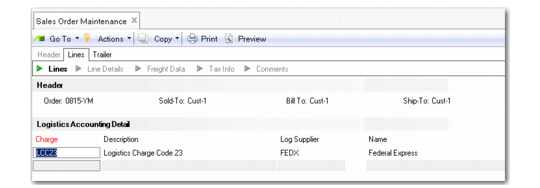
After you have finished entering order line items, the logistics accounting detail frame displays when:
• Logistics Accounting is enabled.
• A freight terms code is specified on the order header.
• The freight terms code indicates an accrual level of shipment or line.
• A freight list is specified on at least one order line.
Sales Order Maintenance, Logistics Accounting Detail Frame
Log Supplier
Enter an address code identifying the freight carrier responsible for transporting this order.
This field cannot be blank. If necessary, you can change the supplier during shipment processing.
When logistics data exists on a sales quote or order, this data is included by the following copy and release functions:
• Sales Quote Copy from Order (7.12.5)
• Sales Quote Copy from Quote (7.12.6)
• Sales Quote Release to Order (7.12.10)
Most freight charges can be modified after they are calculated. When a more accurate logistics charge is calculated, it can be used to calculate a more accurate freight charge. After it is calculated, the freight charge can be modified by the user.
Note: If the freight charge was calculated using apportion method 1 (default), it cannot be modified.
Use Freight Charges Maintenance (2.20.10) to calculate a freight charge. See
Freight Charges Maintenance.
Once the system as calculated the freight charge, modify it as necessary by clicking in the field.
Distribution Orders
When Logistics Accounting is not active, you cannot associate freight data with distribution orders. When Logistics Accounting is active, you can specify freight terms and lists in an additional frame.
Distribution Order Maintenance, Freight Data illustrates the frame that displays for input of freight data in Distribution Order Maintenance (12.17.14).
Distribution Order Maintenance, Freight Data
These fields are similar to the freight fields that display in Sales Order Maintenance. When you set Display Weights to Yes, the system displays a freight frame for each line item. In this frame, you can override the Freight Class and Freight Ship Weight that defaults from the item master.
The freight terms code determines whether you are prompted for a logistics supplier. In distribution orders, only some freight term types have significance. Since freight terms only apply to distribution orders when freight accrual is involved, type 4 (Collect) or type 6 (WillCall) have no meaning. Type 5 (include) also has no meaning for DOs since no item pricing is involved.
When using Logistics Accounting in distribution orders, select one of the following freight term types:
• 1 (ADD): Freight is calculated and accrued by shipment.
• 2 (ALLOW): Freight is calculated and a negative amount is accrued by shipment.
• 3 (PREPAID): Freight is calculated and accrued by line.
From this screen, you can update the charges at the end of the order entry / DO shipper entry.
When average costing is used, the logistics charge amounts are transferred to the receiving site. This ensures that the charges are considered for inventory valuation.
Customer Scheduled Orders
Logistics charges accrue on customer scheduled orders only when the ship-to customer in Scheduled Order Maintenance (7.3.13) has a default freight list and freight terms code defined in Customer Maintenance (2.1.1). Charges accrue when the default freight terms indicate an accrual level of shipment or line.
Shippers
When you use Container Workbench (7.7.1) or SO Container Maintenance (7.7.5) to create containers, the first sales order line item sets the freight terms for the entire container. The system verifies that items added from other order lines have the same freight terms as the first order line added.
These containers are then referenced on shippers using Sales Order Shipper Maintenance (7.9.8) or Pre-Shipper/Shipper Workbench (7.9.2). When you select sales order items for shipment, you can update the logistics supplier associated with the attached sales order in the Logistics Accounting Detail frame shown in
Sales Order Maintenance, Logistics Accounting Detail Frame.
Each sales order attached to the shipper or container on a shipper must use the same freight terms; otherwise an error displays. The freight terms code assigned to the first sales order line is applied to the entire shipper.
Note: You can combine sales order lines with and without freight lists on the same shipper or container.