Processing Shipments
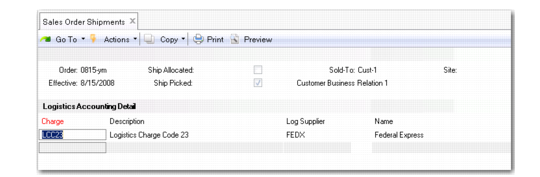
When you process a shipment, the logistics charge code and the logistics supplier are displayed. The supplier can be updated if necessary. Before logistics charges can be accrued during the shipment process, a logistics charge code, logistics supplier, and shipment identifier must be defined.
Processing shipments:
• Creates pending invoices for logistics charges
• Creates GL transactions for the logistics charge accrual amounts
• Calculates tax on logistics charges
The system uses the freight terms assigned to an order to determine whether an accrual is created for each order line or the entire shipment. See
Updating Freight Terms.
The system calculates freight charges based on the order, customer or ship-to site information, and freight information entered in the programs on the Freight Charges menu. See
Setting Up Freight Charges.
Note: Only one pending invoice is created for each shipment or shipper. When logistics charges are accrued by order line, detail lines are added to the pending invoice and the accrual value is updated.
Discrete Shipments
Processing a discrete shipment in any of the following programs creates a pending invoice when the freight terms assigned to the order or line indicate an accrual level of shipment and a freight list is specified on at least one order line:
• Sales Order Shipments (7.9.15)
• Pending Invoice Maintenance (7.13.1)
• Distribution Order Processing (12.17.21) or Shipments (12.17.22)
• RMA Maintenance (11.7.1.1), Shipments (11.7.1.16), or Receipts (11.7.1.13)
Note: You can ship and receive from RMA Maintenance.
When Logistics Accounting is active, additional frames and fields display. The same frames and fields that display in Sales Order Shipments also display in the other programs.
Sales Order Shipments, Logistics Accounting Detail
Log Supplier
This field defaults from the logistics supplier specified on the order, but you can change it.
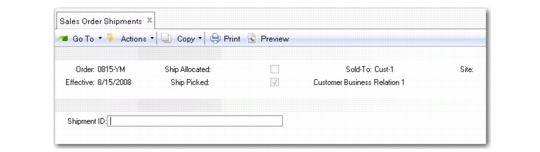
Sales Order Shipments, Shipment ID
Shipment ID
If the NRM sequence code specified in Logistics Accounting Control is an internal sequence, leave this field blank to have the system assign a number. Otherwise, enter a sequence number. The system validates it against the Sales Order Shipment Sequence ID specified in Logistics Accounting Control. See
Sales Order Shipment Sequence ID.
When a pending invoice is created in discrete shipment programs, the shipment ID number is used as the internal reference and the bill of lading (BOL) number is used as the external reference.
Note: If you have set up shipping groups and inventory movement codes, you can create formal shipping documents in distribution order shipping functions. In this case, you are not prompted for a shipment ID; the shipper number is used instead.
Shippers
During the confirmation process in Pre-Shipper/Shipper Confirm (7.9.5) or Pre-Shipper/Shipper Auto Confirm (7.9.7), a pending invoice is created and freight charges accrued based on the freight terms assigned to the first sales order attached to the shipper.
Each sales order attached to the shipper must have the same freight terms code; otherwise, an error displays.
Pending invoices created during confirmation use the shipper number as the internal reference and the carrier shipment reference from the shipper as the external reference.
Unconfirming a shipper in Shipper Unconfirm (7.9.21) reverses the freight accrual created during confirmation.
Return Material Authorizations (RMAs)
RMAs are limited to the receipt of items returned by customers and the issue of replacement items. In RMA Maintenance (11.7.1.1), you can receive items returned by a customer as well as ship replacement items back to the customer. RMA Maintenance performs the functions of both RMA Receipts (11.7.1.13) and RMA Shipments (11.7.1.16). See
QAD Service/Support Management User Guide for details on RMAs.
In all three programs, you can define the logistics supplier and enter a shipment ID used as the internal reference when a pending invoices is created. Since RMAs are similar to sales orders, the logistics accounting fields and processing are the same as Sales Order Maintenance and Sales Order Shipments.
GL Effects
During shipment, the system creates a GL transaction for the entire shipment or for each line, depending on the freight terms.
A sales order shipment creates the following GL transactions:
• Debit the Sales Order Expense account for the logistics charge, product line, site, customer type, and channel.
• Credit Sales Order Accrual for the logistics charge, product line, site, and supplier type.
A distribution order shipment creates the following GL transactions:
• Debit the Distribution Order Expense account for the logistics charge, product line, site, customer type, and channel.
• Credit the Distribution Order Accrual account for the logistics charge, product line, site, and supplier type.
Accrual Currency
For outbound logistics charges, the system uses the order (freight list) and logistics supplier currencies to determine the accrual currency.
• If the order currency is the same as the logistics supplier currency, that currency is used for accruals.
• Otherwise, the system uses the base currency for accruals.