QAD 2017 Enterprise Edition
>
User Guides
>
Master Data
>
Regulatory Attributes
>
Setting Up Regulatory Attributes
Setting Up Regulatory Attributes
Regulatory Attribute features are activated and configured in Regulatory Attributes Control (1.22.24).
Features in Regulatory Attributes Control
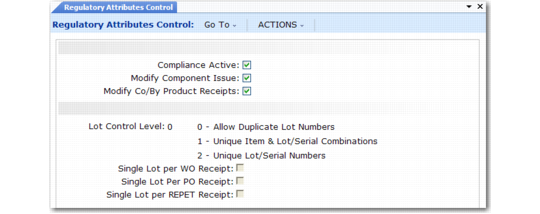
Use Regulatory Attributes Control, illustrated in
Regulatory Attributes Control (1.22.24), to set up these features.
Regulatory Attributes Control (1.22.24)
Compliance Active
Enter Yes or No depending on which features you want to use:
No: Only lot control features are active, based on the setting of Lot Control Level.
Yes: Work order attributes (including batch numbers), expired inventory transactions, and controlled substances are active.
Modify Component Issue
Enter Yes to issue any component to a work order. Enter No to restrict items issued to a work order to those listed on the work order bill of material (BOM) or valid substitute items.
Note: Set up substitute items in Item Substitution Maintenance (13.19).
Modify Co/By-Product Receipts
Enter No to require all receipts to be valid items or substitute items for a co-product or by-product in a joint work order set. Enter Yes to allow any item to be received as an unplanned receipt.
Lot Control Level
Enter 0, 1, or 2.
0–Allow Duplicate Lot Numbers. Any lot number can be specified for any item number.
1–Unique Lot/Serial per Item Number. You cannot assign an item on an order a lot or serial number that is already used by that item on another order. For example, if work order WO1 assigns item A a lot number of 10, no other purchase or work order can assign lot number 10 to item A.
2–Unique Lot/Serial Numbers. You cannot assign an item a lot or serial number that is already used by another item in inventory. For example, if item A has a lot number of 10, item B cannot be assigned a lot number of 10. Rework work orders, expense work orders, and distribution orders do not have this restriction.
Single Lot per WO Receipt
Indicate whether work order receipts are restricted to a single lot.
No: Multiple receipts for an order can use the same lot number, if needed.
Yes: A new lot number is required for each receipt.
This setting determines the default for the Single Lot field of Work Order Receipts (16.11) and Work Order Receipt Backflush (16.12), where it can be changed as needed.
For more information on the effects of the Single Lot fields, see
Single Lot per Receipt.
Note: The Single Lot settings have no effect when Lot Control Level is set to 0.
Single Lot per PO Receipt
Indicate whether purchase order receipts are restricted to a single lot.
No: Multiple receipts for an order can use the same lot number, if needed.
Yes: A new lot number is required for each receipt.
This setting determines the default for the Single Lot field of Purchase Order Receipts (5.13.1), where it can be changed as needed. This setting also affects Returns to Supplier (RTS) in the Service/Support Management module. When this field is Yes and you have received an item lot, you cannot receive it again on an RTS.
Single Lot per REPET Receipt
Indicate whether end-item receipts in repetitive transactions are restricted to a single lot.
No: Multiple receipts for an order can use the same lot number, if needed.
Yes: A new lot number is required for each receipt.
This setting determines the default for the Single Lot field of Repetitive Labor Transaction (18.14), as well as Backflush Transaction (18.22.13) and Move Transaction (18.22.19) in Advanced Repetitive.