Periodic Costing Cost Sets
You begin the cost set setup using Cost Set Maintenance (30.1) to set the cost set to PC and set a template. Then, you use PC Periodic Cost Set Maintenance (30.5.1.4) to specify a detailed (child) cost set for the template cost set.
Cost Set Maintenance
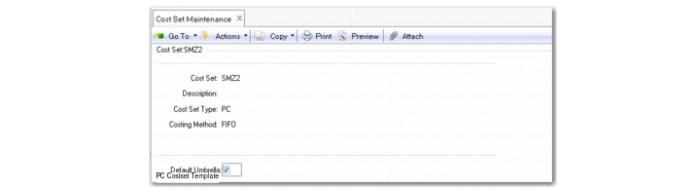
Set the Cost Set Type to PC (Periodic Costing) indicating its purpose. When PC is the cost set type, the system displays an additional frame to indicate whether to use the PC cost set template.
Cost Set Maintenance (30.1)
Cost Set
Enter the PC cost set name.
Cost Set Type
Choose PC (Periodic Costing).
Costing Method
The default is either FIFO or WAVG, based on the costing method you specify in Periodic Costing Control; see
Periodic Costing Control.
Default Costset
Indicate Yes or No to define this cost set as the Periodic Costing cost set template when you use Periodic Costing to calculate inventory. The default is No. This field is editable only when you enable the Periodic Costing module. The field displays only when you set Costing Type to PC (Periodic Costing).
When the cost set is the first PC Cost Set Type and the cost set is the template, the system sets this field to Yes.
PC Periodic Cost Set Maintenance
You can use PC Periodic Cost Set Maintenance (30.5.1.4) to specify a detailed (child) cost set for a template cost set. You specify a template cost set in Cost Set Maintenance. In Periodic Cost Set Browse (30.5.1.5), you can see the detailed cost set displayed as the code of the template cost set followed by:
• Three characters of currency, and
• Two characters of the fiscal year, and
• Two characters for the GL period, and
• Three-digit numbers at the end
For WAVG, you can run PC Periodic Cost Set Maintenance (30.5.1.4) to have the system automatically create PC periods that are the same as GL periods. For FIFO, you can run PC Periods Maintenance (30.5.1.1) first when you have multiple buckets in one GL period; then run PC Periodic Cost Set Maintenance.
The last three-digit numbers vary from WAVG to FIFO. For WAVG, they are always 001. For FIFO, the last three-digit numbers depend on how many buckets are defined in PC Periods Maintenance (30.5.1.1). For example, if there are three buckets, the number can be 001~003.
If you create a detailed cost sets for a template cost set, you cannot delete the template until you delete the detailed costs sets first.
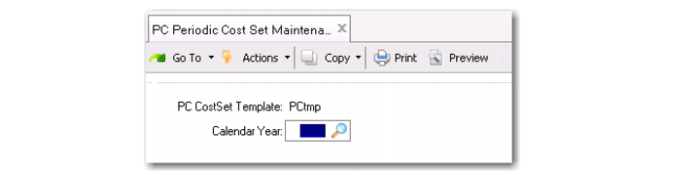
When you run PC Periodic Cost Set Maintenance, the default template cost set displays. Enter a year, then select Yes when the system prompts you to create the detailed cost set; see
PC Periodic Cost Set Maintenance (30.5.1.4). If you have enabled statutory currency, detailed cost sets are created for both the base and the statutory currencies.
Before running periodic cost calculations, verify that a detailed periodic cost set has been created for the respective periods. Also, you can check Periodic Costing cost sets by using Cost Set Browse (30.1.2).
PC Periodic Cost Set Maintenance (30.5.1.4)