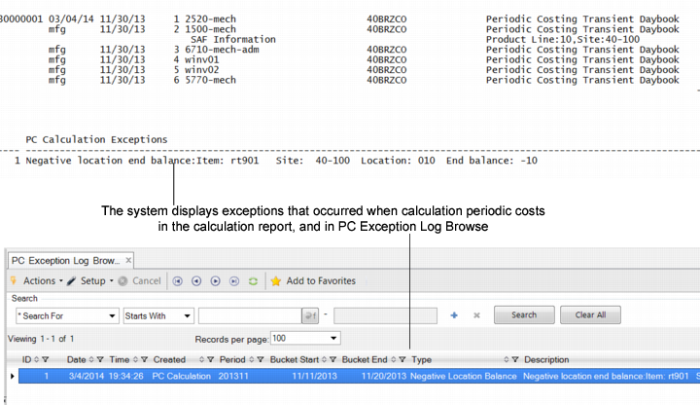
Calculation Exceptions
The Periodic Costing calculation program generates exceptions at the end of the calculation display that shows transactions that were not processed so that you can identify the reason and make corrections. You can use the program-supplied exception log or the PC Exception Log Browse (30.5.7.2) to quickly view the transactions that can cause Periodic Costing results to not match accounting in the Financials and operational modules, resulting in unbalanced accounts.
The transactions are typically due to unexpected defects that were never processed during the calculation and, thus, caused the program to finish with unbalanced GL and operations. The exceptions that display at the end of the calculation report also show you when the quantity for the period is negative as this causes PC unit cost to be negative. Other reasons that the calculation encounters exceptions can include errors such as:
• Integration tables that are missing or not correctly retrieved; for example, logistic charges are not identified in RCT-LA transactions
• Supplier invoices not found during RCT-PO calculation
• Unit cost calculations that end up with the wrong negative value
• References to cost elements that does not exists, etc.
The PC Exception Error Log Browse reports:
• A negative in beginning or ending balance.
• Adjustment in a discrepancy account
• Not enough WIP for by-product work order receipt
• All transaction data within the Periodic Costing period that affects an item value or an average cost that should be processed during the calculation. If either transaction is skipped, the program logs the transaction.
• Cost adjustment transactions applied to a cost set that has 0 (zero) in quantity.
• Exceptions where the offset account is not zero.
• Subcontract processes that are missing subcontract transactions.
• Items where overhead is not reversed or adjusted.
• Transfers where non zero is assumed; that is, the transfer account should be zero assuming all the ISS-TR/RCT-TR match.
• Transfers between sites that have different costs, and therefore, create a discrepancy
• Unclosed pending vouchers that are not fully matched with supplier invoices, and therefore, leaving the receipt transaction unprocessed.
Note: You set Use Supplier Invoice to Yes in Periodic Costing Control to use the cost specified in the supplier invoice; see
Periodic Costing Control.
Also, when you use the FIFO method to calculate costs, the system checks the total receipt quantity of the bucket and also checks the exception log if it is negative. When you use the WAVG method to calculate costs, the system checks the beginning balance plus the receipt quantity of the period and logs exceptions when it is negative.
The Periodic Costing exception logs report when the work order has been deleted, even though inventory or operational transactions exist and there is issue activity. You should re-create the work order.
When you run the calculation, when the system encounters a transaction that references an invalid or deleted work order, the system uses a zero (0) cost for the transaction and displays an error in the PC Exception Log browse (30.5.7.2), indicating the transaction and problem description so you can make the appropriate correction or adjustment. For more information on the PC Exception Log Browse, see
Calculation Exceptions. When the work order master has been deleted, this information displays, too, and the cost is zero.
Periodic Costing Calculation Exception Display