Setting Up Categories
A category is a logical grouping of accounts related to specific approvers. For example, you might have one person in your organization review all computer purchases.
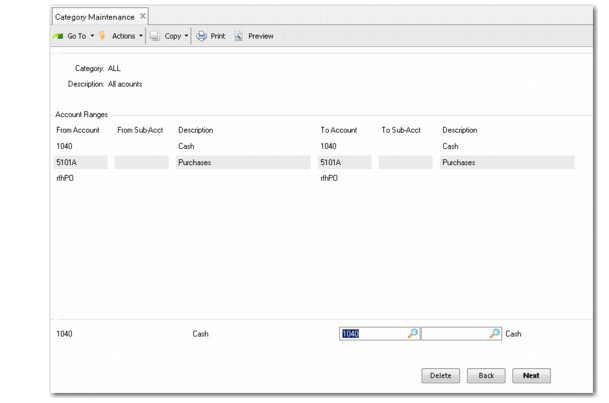
Depending on the way your company wants to manage the requisition approval process, you can establish a set of categories with Category Maintenance (5.2.1.4). The center frame displays ranges of accounts and sub-accounts already associated with the category; use the bottom frame to add, modify, or delete records.
The same account numbers can be included in more than one category. Each account and sub-account you enter must be valid on its own and in combination with each other.
Use Category Report (5.2.1.5) to view descriptions and ranges of accounts associated with existing categories.
Category Maintenance (5.2.1.4)
Category
Enter a one- to four-character alphanumeric code identifying a category.
Description
Enter a brief description of the items in the category, such as computer equipment or communications. This description appears on various inquiries and reports.
From Account
Specify the beginning of a range of accounts to be included in this category. The same account numbers can be included in more than one category. The accounts must be of GL type Standard.
From Sub-Acct
Specify the beginning of a range of sub-accounts to be included in this category. Leave blank to include all sub-accounts up to the value specified in To Sub-Acct. This field can be left blank.
To Account
Specify the end of a range of accounts to be included in this category. To Account defaults to same value as From Account. Leave the default if you want only one account included. This field cannot be left blank.
To Sub-Acct
Specify the end of a range of sub-accounts to be included in this category. To Sub-Acct defaults to same value as From Sub-Acct. Leave the default if you want only one sub-account included. This field can be left blank.