Global Requisition System (GRS)
Introduction to GRSIntroduces GRS and explains some of the features.
Implementing GRSDiscusses how to set up GRS appropriately, use it to plan for approvals, define required settings, and set up specific roles, tasks, and functions.
Creating Purchase RequisitionsDescribes Requisition Maintenance and explains how to create a requisition and approve MRP Planned Orders.
Reviewing and Approving RequisitionsDescribes the procedures for approving, denying, or rerouting purchase requisitions using Requisition Approval Maintenance or Requisition Queue Browse.
Using Requisitions to Build POsExplains how to build POs, create and modify purchase orders, and view GRS data.
Introduction to GRS
The Global Requisition System (GRS) lets you create multiple-line purchase requisitions and route them through the approval process. Based on the type of purchase, the cost, and the requestor’s department, the system determines which individuals are authorized to approve the requisition. Optionally, GRS sends e-mail messages throughout the requisition life cycle to communicate status and required actions to originators, end users, reviewers, approvers, and buyers.
Reviewers and approvers can use the features of GRS to modify, approve, deny, or cancel entire requisitions or individual line items. When a requisition has been approved at the specified final level, a buyer can use approved requisition lines to build purchase orders (POs).
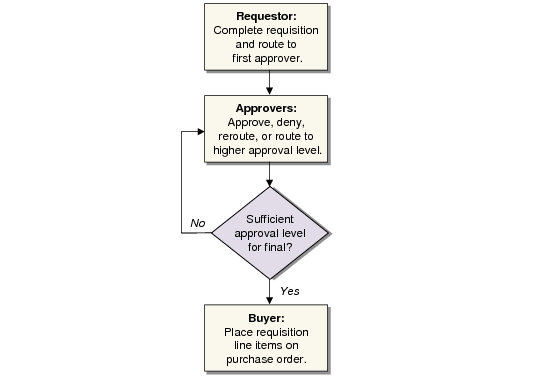
Requisition Process is a simplified flow diagram of the requisition process.
Requisition Process
Features of GRS
Flexible Approval Process
You can set up approval levels based on the way you assign responsibilities within your company.
• Approvers can be defined vertically through your organization, relating the approval levels to entities, sub-accounts, and cost centers.
• You can also set up approvers horizontally based on the categories of items they are approving.
• If an individual is responsible for a project that crosses different organizations, you can set that person up as a job approver.
• Or, a person who is responsible for replenishing inventory used for manufacturing can be a product line approver.
Multiple-Line Requisitions
GRS features multiple-line entry. You set up default information, such as the supplier, the requesting site, and the need date, in a header applying to the whole requisition. If you need to change any of this information for a single line item, you can override much of it on a line-by-line basis while you are entering individual requisition items.
You can also create a multiple-line requisition by approving a group of MRP planned orders.
System-Generated E-mail
From the time a requisition begins the approval process until the last line item is referenced on a purchase order, GRS can use your e-mail system to advise end users, reviewers, and approvers of the requisition’s status. Messages include notifications that a requisition is waiting for an approval and notifications to buyers when requisitions are approved.
If you use these features, you have two choices of e-mail mode. In regular mode, a minimum number of messages are generated, mainly to inform approvers that their inputs are needed. If you select extended mode, the system also sends status messages to the requestor and end user.
PO Build from Requisitions
GRS reduces repetitive data entry by letting you generate a purchase order directly from approved requisitions. Common data from the requisition header is copied into the purchase order header. You can then copy approved requisition line items to build the detailed line items on the purchase order.
GRS Work Flow
Global Requisition Programs shows the functions available in the GRS module.
Global Requisition Programs
Menu Number | Description | Program Name |
5.2.1 | Setup Menu | |
5.2.1.1 | Approval Level Maintenance | rqlmt.p |
5.2.1.2 | Approval Level Browse | rqliq.p |
5.2.1.4 | Category Maintenance | rqcmt.p |
5.2.1.5 | Category Report | rqcrp.p |
5.2.1.7 | Job Maintenance | rqjmt.p |
5.2.1.8 | Job Browse | rqjiq.p |
5.2.1.13 | Horizontal Approver Maintenance | rqahmt.p |
5.2.1.14 | Vertical Approver Maintenance | rqavmt.p |
5.2.1.15 | Job Approver Maintenance | rqajmt.p |
5.2.1.16 | Product Line Approver Maint | rqaplmt.p |
5.2.1.17;
5.2.1.41 | Approver Report
Enhanced .NET UI version | rqarp.p |
5.2.1.20 | Buyer Maintenance | rqbmt.p |
5.2.1.24 | Requisition Control | rqpm.p |
5.2.3 | Requisition Maintenance | rqrqmt.p |
5.2.4 | Requisition Inquiry | rqrqiq1.p |
5.2.5 | Requisition Browse | rqrqiq5.p |
5.2.6 | Requisition Report | rqrqrp5.p |
5.2.8 | Requisition History Log | rqrqrp4.p |
5.2.10 | Requisition Queue Browse | rqbr161.p |
5.2.13 | Requisition Approval Maintenance | rqapmt.p |
5.2.14 | Requisition Routing Maintenance | rqrtmt.p |
5.2.15 | Approval Status Inquiry | rqrqiq2.p |
5.2.16 | Approver’s Open Req. Browse | rqbr001.p |
5.2.17 | PO and Req. Cross Reference | rqpoiq.p |
5.2.18 | Build PO from Requisitions | rqpobld.p |
5.2.19 | Requisition to PO Report | rqrqrp6.p |
5.2.43 | Requisition to PO Report | Enhanced .NET UI version |
5.2.21 | Out of Tolerance Browse | rqbr003.p |
5.2.23 | Requisition Delete/Archive | rqrqup.p |
36.9.3 | Requisition Accounting Control | firqpm.p |
GRS programs fall into five groups. The programs you use depend on your role in the requisition process.
• GRS setup (system administrator)
• Requisition creation (requestors)
• Requisition approval (reviewers and approvers)
• PO build (buyers)
• Reports and inquiries (as needed)
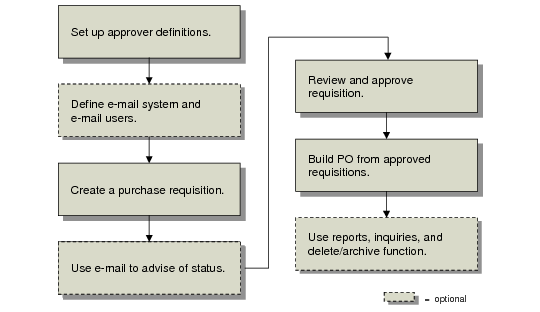
GRS Task Flow shows the overall flow of GRS tasks. Subsequent sections describe each step in the requisition process.
GRS Task Flow