Setting Up Jobs
A job is a relatively short-term set of tasks, such as a limited-duration project. People from many different sub-accounts or cost centers often issue requisitions for the same job. To keep purchase accountability with one person—usually the project manager—you can set up a job code. Use Job Maintenance (5.2.1.7) to define jobs. Job Browse (5.2.1.8) lets you view existing job definitions.
Note: While job and project are used for the same type of activity, projects are actually a component of an account and track expenses in the GL. Job is used only to determine an approver for a requisition.
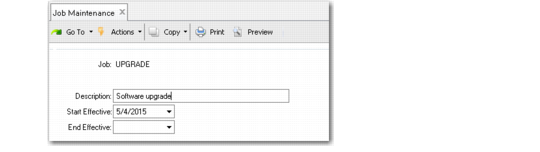
Job Maintenance (5.2.1.7)
Job
Specify an alphanumeric code identifying a job. When an approved requisition line is copied to a purchase order, this information is added to the Sales/Job field on the PO line. The job code is not validated against any system data. Consider establishing naming standards for your company to make the codes easy to recognize on reports and inquiries.
Description
Enter a brief description of the project or activity for this job. This description appears on various inquiries and reports.
Start Effective
Specify the first date this job can be used on a requisition. The default is blank. Effective dates are optional. If you leave the date fields blank, the job is effective indefinitely.
End Effective
Specify the last date this job can be used on a requisition. The default is blank.