QAD 2017 Enterprise Edition
>
User Guides
>
Purchasing
>
Purchasing
>
Using Temporary Pricing for Purchase Orders
Using Temporary Pricing for Purchase Orders
Overview
New products are often introduced at a faster pace than contracts can be finalized. Some companies need to define price lists that do not represent final prices. For example, they may want to issue purchase orders and supplier schedules while prices are still being negotiated with the supplier. In some cases, companies may be legally prohibited from issuing POs without prices.
In that scenario, a temporary price is assigned to the purchasing contract, which can be a discrete purchase order or a supplier scheduled order. This enables the newly sourced product to be ordered using the temporary price. Once the price has been agreed on between company and supplier, any purchase orders/supplier scheduled orders or receipts that were processed using the temporary price can be repriced.
This is a widely accepted business practice in Asia. Additionally, repricing an order retroactively—that is, renegotiating a price after it has been agreed on—is common in the automotive industry.
When you set the Temporary Price field to Yes in the supplier price list record, you are defining a price list that is considered temporary. When a purchase order or supplier scheduled order references such a price list, the temporary price applies. After the final price is negotiated and you update the price list, the process depends on the status of the order cycle:
• If the price list is updated with the negotiated price before the order is received, the system updates the purchase order or supplier schedule with the new price.
• If the price is updated after the order is received but before invoicing, the system creates receipts based on the temporary price, then adjusts the order with the new price when it is available.
• If the price is updated after invoicing, the system creates supplier invoices and pays the supplier based on the temporary (receipt) price.
Note: The system only selects order receipts with temporary prices for receiver matching (that is, invoicing) when Match Receipts with Temporary Price in Supplier Invoice Control is Yes.
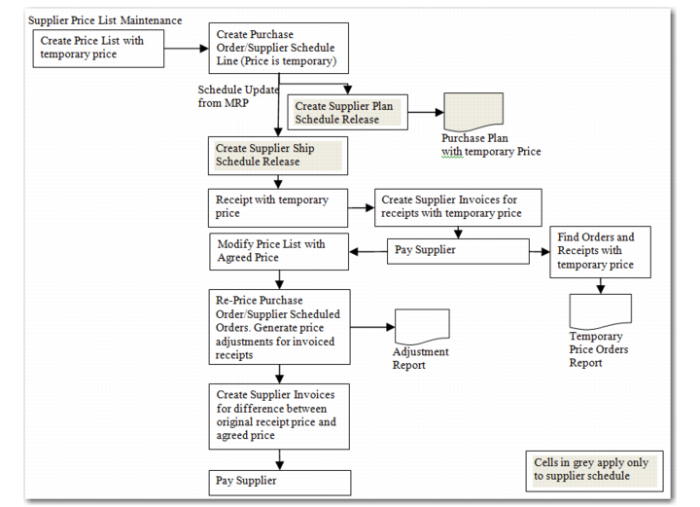
When the price is finalized, the system reprices the order, then generates price adjustments for the invoiced receipts, creates supplier invoices for the difference between the receipt price and the final price, and pays the supplier as needed. The example in
Example Temporary Pricing Process Flow (Price Negotiated After Invoicing) illustrates this scenario.
Important: Temporary Price Enabled must be Yes in Purchasing Control for this feature to be available.
Example Temporary Pricing Process Flow (Price Negotiated After Invoicing)