Adjusting Temporary Prices
After you and your supplier have agreed on the final price of an item, you can use Temporary Price Order Report to list purchase order lines, supplier schedule lines, and receipts that use temporary prices.
Then, use Retroactive Purchase Price Adj to generate price adjustments for invoiced receipts of a purchase order/supplier scheduled order line, as well as to create invoices to reflect the updated price.
Important: The function does not work when either of the following is true:
• The receipt is partially matched on one invoice and marked as finished.
• The receipt is matched on multiple invoices.
In such cases, you must handle retroactive price changes manually.
Note: This function is disabled when Fiscal Receiving is in use.
This function identifies the purchase order/supplier scheduled order lines that have had price changes. If a supplier invoice has been created for a purchase receipt, and the supplier invoice price is different from the new price, this function creates price adjustments to the receipt.
You can use Retroactive Price Adjustment Report to view order lines that either have had a price adjustment have had receipts adjusted. The report shows original purchase receipt and all price adjustments after the receipt is invoiced.
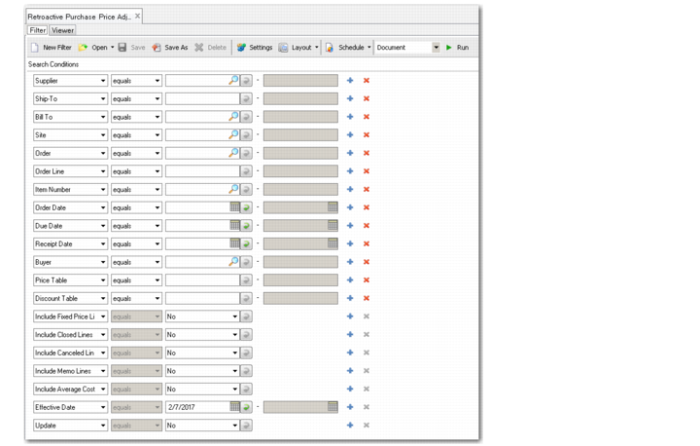
Retroactive Purchase Price Adj
Retroactive Purchase Price Adj includes several selection criteria fields that let you select one or more purchase order lines to be adjusted.
System Processing Flow
Get Latest Price
The system gets the latest price for each order line matching the selection criteria based on the following rules:
• Order lines with Type set to R are not considered for price adjustment.
• When Fixed Price is Yes, system always gets the latest price from the order line.
• When Fixed Price is No, but no supplier price list is used, the system searches the following records until it finds a price: Supplier Item Maintenance, then Item-Site Cost Maintenance, then Item Maintenance.
• When Fixed Price is No and a supplier price list is used, the system uses the date found by the following logic to get the latest price based on the price list effective date range:
Consigned | ERS Price List Option | PO Cost Point | Date Used for Price Adjustment |
No | No | N/A | Effective Date on receipt |
No | Order Date | N/A | Order Date |
No | Ship Date | N/A | Ship Date |
No | Receipt Date | N/A | Effective Date on receipt |
Yes | No | Receipt | Effective Date on receipt |
Yes | No | Usage | Effective Date on usage |
Yes | Order Date | Receipt/Usage | Order Date |
Yes | Ship Date | Receipt/Usage | Ship Date |
Yes | Receipt Date | Receipt | Effective Date on receipt |
Yes | Receipt Date | Usage | Effective Date on usage |
Calculate Variances
The system next calculates the price variance:
Price Variance = Latest price - [invoice price on original price + sum (invoice price on price adjustments) + sum (price on price adjustments that are not vouchered)]
• If price variance is zero, no new price adjustment is created.
• For non-ERS lines, if the price variance is not zero, but the receipt price on the original receipt is equal to the latest price and no price adjustment was created, the system does not create a new price adjustment.
• For all other scenarios, the system create a new price adjustment based on the price variance.
Create Transactions
The system then creates an ADJ-PO inventory transaction to record the price adjustment and posts to the GL as follows.
Note: The amount posted to the GL is Price Variance * Quantity.
If Standard Cost is used:
• DR: PO Price Variance; CR: PO Receipt (Post to the entity linked to the PO line site)
If Average Cost is used:
• DR: Inventory; CR: PO Receipt (Post to the entity linked to the PO line site)
• DR: Inventory Discrepancy; CR: PO Receipts (Post to the entity linked to the PO line site)
When the adjusted inventory quantity is less than Quantity on Hand of PO line site, the entire price variance amount is posted to Inventory.
When the adjusted inventory quantity is greater than Quantity on Hand, Quantity on Hand/adjusted inventory quantity as a percentage is used as a percentage to determine the price variance amount to be posted to Inventory. All other price variance amounts are posted to Inventory Discrepancy.
If Inventory on PO line site is located in multiple locations that refer to different Inventory accounts, the systems splits the posting to the corresponding Inventory account based on the percentage of the location inventory QOH to site inventory QOH.
For Subcontract PO lines—depending on the status of the work order—the system creates transactions as follows:
Scenario | Transaction | Debit/Credit | Account | Notes |
No Work Order/WO closed | ADJ-PO | DR | Cost of Production | |
| | CR | PO Receipts | |
With Work Order | ADJ-PO | DR | Cost of Production | |
| | CR | PO Receipts | |
| SUBCNT | DR/CR | WIP | DR when Price Adj > 0. Otherwise CR. |
| | CR/DR | Cost of Production | |
| | DR/CR | Subcontract Rate Variance from work order | Not created for AVG. DR when Price Adj > 0. Otherwise CR. |
| | CR/DR | WIP | |
If cross-company is involved (for inventory item and subcontract):
• DR: PO Receipt Acct; CR: Cross-Company Inventory Control account for entity of the PO line (Post to the entity linked to the PO line site)
• DR: Cross-Company Inventory Control account for entity of PO header site; DR: PO Receipt Acct (Post to the entity linked to the PO header site)
For memo items:
• DR: Purchase Account
• CR: Expensed Item Receipts
If cross-company is involved for memo items:
• DR: Expensed Item Receipts; CR: Cross-Company Inventory Control account for entity of the PO line (Post to the entity linked to the PO line site)
• DR: Cross-Company Inventory Control account for entity of PO header site; DR: Expensed Item Receipts
Cost Integration
Note: If a tax amount needs to be included in the new item cost, the system adds the non-recoverable tax amount to the current cost adjustment.
• When GL cost method is AVG. Assume that the original inventory is as below. Original inventory cost is cost1.
Location | Original Qty | Inventory Acct |
Loc1 | Qty1 | Inv1 |
Loc2 | Qty2 | Inv2 |
Scenario 1: The price is adjusted for Quantity Qty3 which is less than Qty1 + Qty2. The new cost cost2 would be (Qty3 * Price Variance + cost1 * (Qty1 + Qty2) ) / (Qty1 + Qty2)
Scenario 2: The price is adjusted for Quantity Qty3 which is greater than Qty1 + Qty2. The new cost cost2 would be (Price Variance + cost1).
Scenario 3: The cost is not updated when Qty1 + Qty 2 <= 0.
Note: Cost is not updated when Qty3 < 0.
• When current cost method is AVG, the cost calculation is the same as with GL cost.
• When current cost method is Last, system does not update cost.
• The system supports Update Avg/Last Cost on PO line.
Tax Integration
For recoverable tax amount:
• DR: AP Inv Tax Acct
• CR: PO Receipts