QAD 2017 Enterprise Edition
>
User Guides
>
Purchasing
>
Purchasing
>
Subcontract Purchasing
Subcontract Purchasing
Instead of materials, suppliers sometimes provide services for completing manufacturing operations. Companies subcontract operations when there is insufficient manufacturing capacity or when operations require specialized equipment.
Like inventory items, subcontract services are set up in Item Master Maintenance (1.4.1). However, they are received to work orders rather than to inventory. As a result, MRP does not consider them a source of supply since these quantities are already included in the work order.
During order entry, the system prompts you to enter the work order number, work order ID, and operation for the subcontract item. This information is needed by the receiving process.
Subcontract purchase orders can be used with the Work Orders module, or with Repetitive and Advanced Repetitive functions. Advanced Repetitive subcontracting supports additional features of subcontract shipping. For example, when receiving subcontracted items, you can connect subcontract shippers to the receipt for more subcontract visibility.
See the Advanced Repetitive information in
QAD Manufacturing User Guide.To receive against a subcontract shipper, set Manual Shipper Update to Yes in Subcontract Shipping Control (18.22.5.24). When you set this field to Yes, the Subcontract Shippers frame displays in Purchase Order Receipts (5.13.1), PO Shipper Maintenance (5.5.5.5 or 5.13.14), and Purchase Order Returns (5.13.7).
When you connect a subcontract shipper ID to purchase order lines you are receiving against, you can also:
• Place the items into finished goods automatically if the subcontract operation is the last operation and the items are lot- or serial- controlled.
Note: If WIP item components are lot/serial controlled, you must use the Advanced Repetitive Move Transaction (18.22.19) to record the WIP item placement into inventory. If only the WIP item is lot/serial controlled, then the placement into inventory occurs during receipt.
• Optionally scrap unreturned subcontracted items.
• Optionally close the subcontract shipper.
A number of accounting and cost issues in subcontract purchasing influence use and implementation of other modules.
The following sections discuss subcontracting with work orders.
Subcontract Pricing
In Items/Sites, supplier items should be set up with quote prices and quote quantities so that the unit cost on subcontract purchase orders defaults correctly. The order of precedence for determining the correct price is as follows:
• Price list
• Quote
• GL cost
Inventory and Cost Control
There are several ways of tracking components provided by you or the subcontractor. When components are supplied in kits for individual work orders, they should be handled as regular work order components.
Sometimes a manufacturer provides components to the supplier, who stores these as consignment inventory until used. In this case, set up a separate inventory site and location for supplier inventory since the supplier site is functioning as an extension of your company’s inventory.
A supplier may provide components that are added during subcontract operations. Since there is no requirement to track supplier inventory, the cost of the components is usually included in the subcontract purchase cost. Normally, the components are not planned by MRP, and do not appear on work order picklists. To have them appear on product structures, you must exclude them from MRP and work order picklists. Also, the component costs must not be included in cost rollups for the parent product. One way to ensure this is to assign a structure code of D (document) to the components.
Subcontract Lead Time
Use Routing Maintenance (14.13.1) to enter subcontract lead time. A subcontract lead time applies to an entire lot, not to individual units. The lead time for a work order operation is the same whether the quantity ordered is 1 or 10,000.
Routings and Work Centers
Consider setting up separate departments (and possibly work centers) for outside processing to distinguish them from internal operations. Define departments and work centers for individual suppliers if more than one supplier can perform a particular operation.
Example: Have all subcontract work center codes begin with the letter S to easily identify them on reports such as the Work Order Dispatch Report (16.18).
Triggering Purchase Orders
If work order operations are used with work orders, determine when to release purchase orders for subcontract operations with Work Order Dispatch Report. This report lists upcoming operations by work center, then by item.
Specifying Subcontract Suppliers for a Routing
Typically, you select subcontractors to process items based upon agreed processes. You can associate a subcontract service with the subcontracted items and the supplying subcontractor.
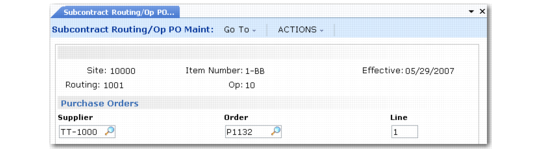
Use Subcontract Routing/Op PO Maint (5.11) to specify subcontract suppliers for a specific routing and operation. You can specify multiple suppliers for a single routing and operation.
When you specify a subcontract supplier for a routing operation, the system connects purchase orders to a routing and operation via the supplier. If you use the Advanced Repetitive module, the system updates the subcontract purchase orders with a cumulative ID or work order ID when an Advanced Repetitive transaction occurs that creates a cumulative ID. Additionally, in Advanced Repetitive programs, the system:
• Populates subcontract order-processing fields and browses with subcontractor default data.
• Accumulates subcontract data for reports.
Companies that use scheduled orders for subcontract work can use Subcontract Order MRP % Maintenance (5.5.1.21) to specify a purchase order and line for a subcontract routing and operation.
Specify the ship-to site, item number, effective date, routing, and operation in the header. This key information uniquely identifies a subcontract operation. Specify the supplier and the purchase order and line in the Purchase Orders frame. If you enter both the purchase order and line, the system adds the supplier.
Subcontract Routing/Op PO Maintenance (5.11)
Supplier Capacity
The Resource Planning and Capacity Requirements Planning (CRP) modules can be used to evaluate supplier capacity. Resource planning is set up and implemented in the same way as the planning of internal resources. However, there are special requirements for CRP:
• Set up one work center for each supplier.
• Give each work center its own shop calendar.
• Set up subcontract operations with queue, setup, run, wait, and move times.
Material Requirements Planning
Open purchase order lines for subcontract items are not recognized as supply records by MRP. Supply for subcontract assemblies is represented by their corresponding work orders.
Work Order and Routing Comments
To display work order and routing comments for subcontract orders on printed purchase orders, set Print WO Comment to Yes in Print Purchase Order (5.10). Any relevant comments are printed below each subcontract line item.
Subcontract Work Flow
If all of the modules are used, the subcontract cycle includes the following steps:
1 Work Order Maintenance (16.1) or Planned Work Order Approval (23.10)
2 Work Order Component Check (16.5)
3 Work Order Release/Print (16.6)
4 Work Order Component Issue (16.10)
5 Work Order Dispatch Report (16.18)
6 Purchase Order Maintenance (5.7)
7 Subcontract Routing/Op PO Maint (5.11) or Subcontract Order MRP% Maintenance (5.5.1.21)
8 Purchase Order Receipts (5.13.1)
9 Shop Floor Control labor feedback functions
10 Work Order Receipt (16.11)
11 Work Order Accounting Close (16.21)