QAD 2017 Enterprise Edition > User Guides > Purchasing > Supplier Consignment Inventory > Managing Consigned Inventory > Creating Inventory Transaction History
  
Creating Inventory Transaction History
Every inventory transaction creates a record in inventory transaction history. Each record has a unique, sequential transaction number and a transaction type. Transactions include the following information:
Transaction data
Inventory data
Cost data
GL transaction data
User ID of the person entering the transaction
Supplier Consignment Inventory Transaction Types
The transaction type code identifies the function used to initiate the inventory change. Consignment Transaction Types lists the supplier consignment transaction type codes included in inventory history records with a brief description of each type and some of the programs that create the transactions. Any other programs that create similar transactions (ISS-SO, ISS-WO, RCT‑TR, ISS-UNP) for consigned inventory would also create the special consigned transactions.

Consignment Transaction Types
 
Transaction Type
Menu Number
Program that Creates the Transaction/Description
CN-RCT
5.13.1
5.5.5.11
5.13.20
Purchase Order Receipts
PO Shipper Receipt
Receives consigned inventory into a location. Credits PO Consigned Inventory, debits PO Consigned Offset.
CN-ADJ, RCT-PO
5.18.13
Aging Inventory Update
Adjusts balances of consigned inventory. Instead of extending the aging date of consigned inventory, enter Yes in the Use field to indicate consumption. Initiates receipt transactions.
CN-ADJ
5.18.25.21
Consignment Inventory Adjustment
Adjusts locations, quantities, and other details of consigned inventory. Debits or credits PO Consigned Inventory account and credits or debits PO Consigned Offset account.
ISS-TR, RCT-TR
RCT-PO, CN-ISS
3.4.1
3.4.2
3.4.3
3.4.4
10.5.13
11.1.1.13
11.11.6
18.3.6 18.22.3.6
18.22.5.11
19.26.7
19.26.11
Transfer Single Item
Transfer Multiple Item (positive quantities only)
Transfer with Lot/Serial Change
Batchload Transfer with Lot/Serial Change
Project Activity Recording
Call Activity Recording
Material Order Shipments
Repetitive Picklist Transfer

Sub-Shipper Issue
QM Quality Order Maintenance
QM Quality Order Results Entry
Moves inventory from one location to another.
Note: Consignment transactions occur only when Transfer Ownership is Yes for the receiving location.
RCT-DO, ISS-GIT
12.15.20
 
Distributed Order Receipt
Note: Consignment transactions occur only when Transfer Ownership is Yes for the receiving location.
ISS-DO, RCT-GIT
RCT-PO, CN-ISS
12.17.21
12.17.22
 
Distribution Order Processing
Distribution Order Shipments
Note: Consignment transactions occur only when Transfer Ownership is Yes for the receiving location.
ISS-WO,
RCT-PO, CN-ISS
3.12
16.10
16.12
16.19
17.13.7
17.6.5
18.14
18.17
18.22.13
18.22.17
Receipts–Backward Exploded
Work Order Component Issue
Work Order Receipt Backflush
Work Order Operation Backflush
Flow Schedule Receipts
Kanban Fill/Receive
Repetitive Labor Transaction (manual backflush)
Receipts–Backward Exploded (manual backflush)
Backflush Transaction
Rework Transaction (manual backflush)
CYC-CNT,
RCT-PO, CN-ISS
3.13.2
Cycle Count Results Entry
ISS-SO,
RCT-PO, CN-ISS
7.9.5
7.9.7
7.9.15
7.9.21
7.13.1
7.25.3
11.7.1.16

7.18.13
7.18.14
7.18.15
7.18.19
7.18.22
Pre-Shipper/Shipper Confirm
Pre-Shipper/Shipper Auto Confirm
Sales Order Shipments
Shipper Unconfirm
Pending Invoice Maintenance
SO Batch Shipment Processor
RMA Shipments
When using Supplier Consignment as Customer Consignment:
Inventory Usage Create
Authorization Usage Create
Sequenced Usage Create
Shipper Usage Create
Usage Create Undo
ISS-FAS,
RCT-PO, CN-ISS
8.13
Sales Order Release to Work Order
ISS-UNP,
RCT-PO, CN-ISS
3.7
19.26.7
19.26.11
Issues–Unplanned
QM Quality Order Maintenance
QM Quality Order Results Entry
CN-ISS
All
Credits PO Consigned Offset, debits PO Consigned Inventory
Reviewing Transaction History
Use Transactions Detail Inquiry (3.21.1) to display detailed inventory transaction history records sorted by transaction number. Enter the transaction number to display all the information about that transaction.
When consigned inventory is used, multiple inventory transactions are processed and corresponding transaction history records created. For the consigned transaction, the system records the number of the standard transaction initiating it in the Remarks field.
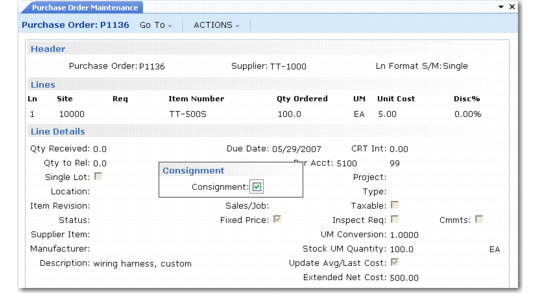
The transactions for purchasing, receiving, and using consigned inventory are shown sequentially in the following figures.
Purchasing Consigned Inventory shows a purchase order (P1136) for 100 consigned items.

Purchasing Consigned Inventory
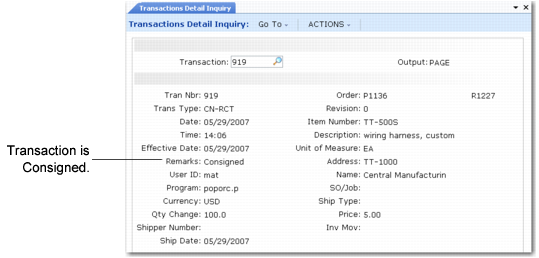
Receiving Consigned Inventory (CN‑RCT) shows the transaction created when 10 of those items are received into the consignment location, which generates a CN-RCT transaction type. The Remarks field identifies this as a consignment transaction.

Receiving Consigned Inventory (CN‑RCT)
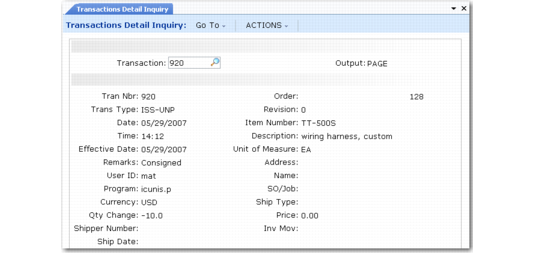
Issuing Consigned Inventory (ISS‑UNP) represents the usage of consigned inventory from the consigned location using an unplanned issue. The ISS-UNP transaction balances against the CN‑RCT transaction to credit the consignment GL accounts that were debited at CN-RCT.

Issuing Consigned Inventory (ISS‑UNP)
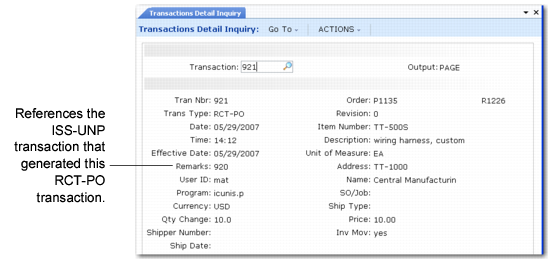
The unplanned issue creates two additional transactions: RCT-PO and CN-ISS. When consigned inventory is used/consumed, it changes ownership and becomes non-consigned. Receiving Regular Inventory (RCT‑PO) shows transaction type RCT-PO that was generated from the usage in Issuing Consigned Inventory (ISS‑UNP). The RCT‑PO balances the ISS-UNP. The Remarks field references the transaction number.

Receiving Regular Inventory (RCT‑PO)
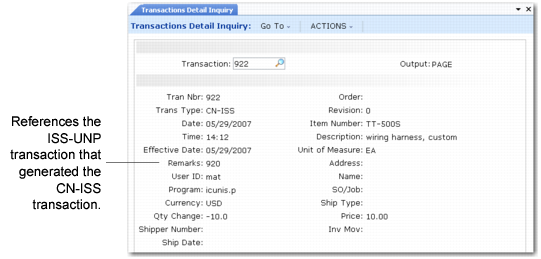
Transaction History for Issuing Consigned Inventory (CN‑ISS) shows the CN-ISS transaction created during a usage. The RCT-PO transaction generates a CN-ISS transaction, which represents the change in inventory status from consigned to non-consigned. This balances the original CN-RCT transaction.

Transaction History for Issuing Consigned Inventory (CN‑ISS)