Ordering Consigned Inventory
When the Supplier Consignment Inventory module is active, additional frames and fields display for user input during order entry in:
• Blanket Order Maintenance (5.3.1)
• Supplier Scheduled Order Maintenance (5.5.1.13)
• Purchase Order Maintenance (5.7)
In all three programs, the system uses a hierarchical approach to retrieve previously entered default data that applies to specific suppliers and items.
• When entering a new order, the system uses default values for the supplier defined in Supplier/Item Controls Maintenance. If a record does not exist for the supplier and a blank item, the system uses defaults defined in Supplier Consignment Control or Supplier Consignment Accounting Control.
• At the purchase order line, the system first uses defaults defined in Supplier/Item Controls Maintenance for the order supplier and line item. If a record does not exist, values default from the order header.
Purchase Order Maintenance
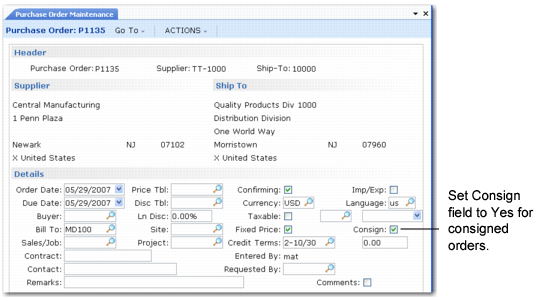
Specify Yes in the Consign field in the purchase order header to indicate that the order includes consigned items.
Note: Scheduled orders and blanket orders are processed the same way using similar fields and frames. They are not illustrated here.
Consign Field in Purchase Order Maintenance (5.7)
Consign
Enter Yes if most items on this purchase order are received from the supplier as consigned inventory.
Enter No if most items purchased from this supplier are non-consigned.
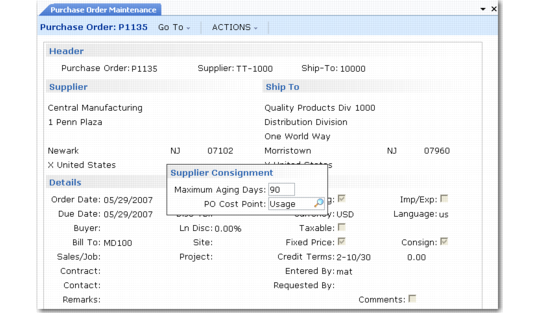
When you specify Yes in the header Consign field, a Supplier Consignment frame displays, illustrated in
Consignment Frame in Purchase Order Maintenance (5.7). Scheduled orders and blanket orders are processed the same way using similar fields and frames.
Consignment Frame in Purchase Order Maintenance (5.7)
Maximum Aging Days
Optionally enter the maximum number of days consigned inventory on this order is allowed to reside at your facility. Enter 0 (zero) to indicate that no scheduled aging deadline exists.
The system automatically adds the number of days entered here to the receipt date to determine the maximum aging date. The calculated date is used by reports to determine how long inventory has been at your facility.
You can extend the maximum aging date as many times as required using Aging Inventory Update (5.18.13) or Aging Inventory Batch Update (5.18.14). An extension automatically updates each receipt.
PO Cost Point
Specify which purchase order cost you want the system to use to calculate the purchase price variance.
Usage: Use purchase order cost at time of usage.
Receipt: Use purchase order cost at time of physical receipt.
The value defaults from Supplier/Item Controls Maintenance or Supplier Consignment Accounting Control. Once a consigned receipt is processed, this field cannot be updated.
When Usage is specified on scheduled purchase orders, the system looks for the current price in the following order:
• Price list associated with the scheduled order
• Supplier/item price
• Cost of the purchase order
When Usage is specified on discrete purchase orders, the system always uses the cost on the purchase order.
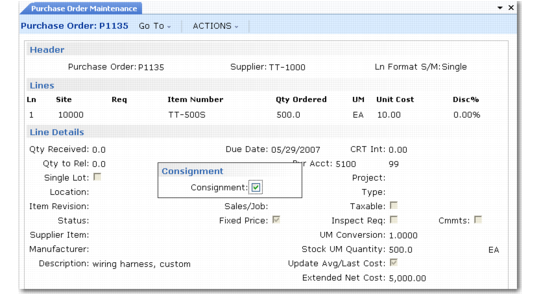
Regardless of what you enter on the header, you are prompted during line-item entry to specify whether the particular line is consigned. If you specify Yes, you can also specify the maximum aging date for the line.
Consignment Line Item Frame in Purchase Order Maintenance illustrates the Consignment field for a PO line.
Consignment Line Item Frame in Purchase Order Maintenance