Configure Validation Settings
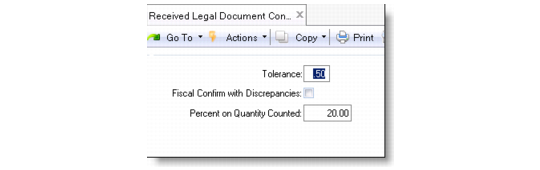
The fiscal confirm validation rules are the values the system complies with to verify and confirm a legal document. Use Received Legal Document Control (5.20.24) to configure the validation rules.
Enter values in the following fields:
• Tolerance
• Fiscal Confirm with Discrepancies
• Percent on Quantity Counted
Use these fields to limit the allowable variance of price and quantity between fiscal and physical receiving information. For more details on this function, see
Fiscal Confirm Validation Rules.
Received Legal Document Control (5.20.24)
Tolerance
During the fiscal confirm process, a series of validation rules determine the success or failure of the fiscal confirm. The value of Tolerance is applied to the validation rules to compare the variance between the legal document declared total and the calculated line total price amount. The value should be a number instead of a percentage.
Fiscal Confirm with Discrepancies
If the field is set to Yes, the system does not perform a variance check between the fiscal and physical quantities. If the field is set to No, the system checks whether the variance between the fiscal and the physical quantities is acceptable, and compare the fiscal unit (including the discount) price with PO price.
Percent on Quantity Counted
Specify the maximum quantity discrepancy in percentage between declared and counted numbers. Enter a value for Percent on Quantity Counted to control the variance allowed between the physical received quantity and declared quantity when processing the fiscal confirm.