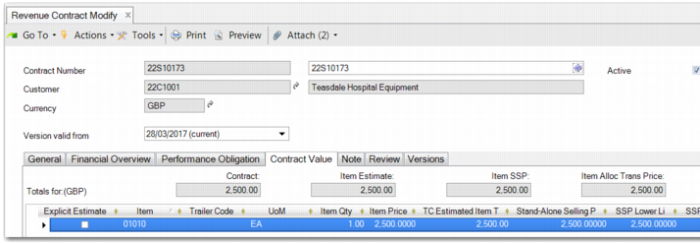
Contract Value Tab
The Contract Value tab records the contract value of the revenue contract. Although you record the performance obligations and their associated sales order and trailer charges on the Performance Obligation tab, the Contract Value tab contains the necessary details for calculating the value of the contract.
Revenue Contract Modify – Contract Value Tab
Contract values are inherited from the Performance Obligation tab. You cannot create contract value lines for items for which there are no orders attached to performance obligations of the revenue contract.
These lines are kept in sync with the performance obligation order lines. You can turn an estimate line into an explicit estimate. However, the system no longer updates these lines and you must then maintain them yourself.
When a new revenue recognition contract is created using Revenue Contract Autogenerate (37.1.5), a performance obligation line is created on the Performance Obligation tab for each sales order line. Simultaneously, contract value lines are generated on the Contract Value tab.
Note: These contract value lines can be of type order or trailer. However, only item lines are used for the allocated transaction price in variable consideration calculations. Trailers are not included in the calculation. Variable considerations examples include discounts, credits, rebates, performance bonus, penalties, sales returns, refunds, price concessions, and incentives.
The Contract Value tab records estimate and non-estimate valuation lines.
• An estimate line is used when there is not enough information to precisely determine the quantity and invoice value of a particular variable consideration on the revenue contract.
• A non-estimate line is used to mirror the value of a particular item listed on a sales order or trailer charge attached to a performance obligation.
In either case, the following information is recorded on a valuation line, which displays the columns in
Contract Value Tab Columns.
Contract Value Tab Columns
Field | Description |
Explicit Estimate | Logical field. Yes indicates that the valuation line is an estimate. |
Item | The item number for the valuation line. |
UOM | Unit of measure for the item. |
Description | The item description. |
Trailer Code | The trailer code for the valuation line. |
Estimated Item Qty/Price | The quantity and price of the item. |
Standalone Selling Price | The price of the item that would be used in an arms-length transaction. |
SSP Upper/Lower limit | The upper or lower SSP price limit to be used in determining whether to calculate a distributed allocated transaction price. |
Allocated Transaction Price | The allocated transaction price of the line. |
TC estimated item total | The total value of the valuation line based on the item total price. |
TC Item Total by SSP | The total value of the valuation line based on the stand-alone selling price. |
TC item total by Alloc Trans Price | The total value of the valuation line based on the allocated transaction price. |
On the Contract Value tab, the allocated transaction price is calculated based on the order value, stand-alone selling price value, and other factors to ensure that the revenue of the revenue contract is distributed across all valuation lines based on the logic dictated by ASC 606 and IFRS 15.
When you update the stand-alone selling prices, this update can trigger an update of the allocated transaction prices on the contract value lines when the SSP value is outside the range of the SSP limits. The associated sales order lines and trailer charge lines on the performance obligations are also updated with the prices. The stand-alone selling prices default to the order value. Non-estimate lines do not allow updates. You can modify a non-estimate line on the Performance Obligation tab.
In the example displayed in
Contract Value Example, a revenue contract has been raised for a customer to cover the purchase of an electrical generator for a factory. The price also includes one year of maintenance and training to help the customer to install and run the electrical generator. This example does not include trailers.
Contract Value Example
Performance Obligation | Rev Rec Rule | Item | Quantity | Order Price | Invoiced Amount | SSP | Allocated Transaction Price |
Deliver and install power generator | Invoice + 15 days | 1 electrical generator | 1 | $1,000,000 | $1,000,000 | $1,000,000 | $896,309.31 |
1 year of maintenance | Periodic | Maintenance - 1 year | 1 | 0 | 0 | $120,000 | $107,557.12 |
2 weeks of consultancy | Customer Acceptance | Initial training | 10 | $2,000 | $20,000 | $18,000 | $16,133.57 |
The four performance obligations on the contract each require a valuation line on the Contract Value tab. There is one line for the electrical generator, one line for the maintenance, one line for the training, and one for the freight cost.
The total stand-alone selling price for the contract is $1,138,000.00. This price is based on each of three items being sold separately in an arms-length transaction. Trailers do not have a stand-alone selling price. The total invoice value of this contract is $1,020,000.00.
The expected revenue from the customer for the items only must be distributed across all three lines because maintenance has been included in the invoice price and the customer has, in effect, not been charged for it. However, revenue is being generated from this maintenance activity. Therefore, part of the money received from the customer has to be considered maintenance revenue. The distribution is displayed in the Allocated Transaction Price column in
Contract Value Example.
The distribution calculation formula is:
(SSP for the valuation line / total SSP for all the valuation lines) * total invoice amount for all the valuation lines
So for the first line, the electrical generator, the allocated transaction price is:
(1,000,000.00 / 1,1138,000.00) * 1,020,000.00 = £896,309.31
The other two lines are calculated similarly, resulting in the allocated transaction prices for the three lines as displayed in
Contract Value Example.