Running Revenue Calculations
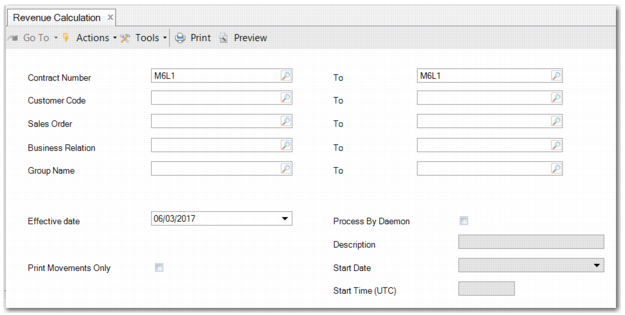
You can manually run revenue recognition calculations to create revenue recognition postings in Revenue Calculation (37.3.1). You can specify the revenue calculations to run using the filter criteria, as displayed in
Revenue Calculation.
You can also choose to create a revenue calculation run that can be scheduled to be processed by the batch daemon. When the batch reaches the target date and time, the system begins to process the batch records and postings are triggered. A new batch is made available for the next day. For more information, see
Processing by Batch Daemon.
Note: Many organizations likely choose to defer or recognize revenue using the API solution.
Revenue Calculation
The fields on the Revenue Calculation menu are:
Contract Number
Enter the contract number range that you want to process. You can specify one or multiple contracts.
Important: If any contract in the range requires a review, the relevant contract version must be reviewed before it can be processed by the revenue calculation. When the contract version is not marked as reviewed, the revenue calculation skips the processing of that contract.
Customer Code
Enter a customer code range. If you leave the Customer Code field blank, the system automatically generates a number for the record based on the sequence defined in Customer Autonumber Create.
Sales Order
Enter a sales order range.
Business Relation
Enter a business relation range. If you leave this field blank, the system automatically generates a number for the record based on the sequence defined in Business Relation Autonumber Create.
Group Name
Enter a group name range containing corporate groups.
Effective Date
This field enables you to specify an effective date for the calculation run. By default, the field is set to the current system date. You can choose a future or past date.
However, running the revenue calculation on a date before existing calculated transactions creates new transactions on the specified date. The new transactions can potentially invalidate any existing transactions dated after the new ones. In this case, the revenue calculation must make reversal and correction postings for the contracts being processed.
The field is not active when you select the Use Daemon field.
Important: A revenue contract can have several versions. Each version is effective for a specific period during the life-time of the revenue contract. The revenue calculation always runs for the active version on the effective date. Any revenue recognition postings created by the calculation are based on the version of the revenue contract selected by the calculation.
Print Movements Only
This field enables you to control how much revenue contract information is printed on the report. When the field is clear, all the performance obligations of a revenue contract are printed, even if there are no deferred or recognized amounts. When you select this field, only performance obligations with deferred or recognized amounts are printed.
Process By Daemon
Select this field to use the batch daemon to automatically perform the revenue calculation at a specified time each day.
Description
Enter a description that is visible in Batch Daemon Monitor when the calculation is queued for processing. This field is only active when you select Process By Daemon.
Start Date
Specify a start date of today or sometime in the future for this revenue calculation. The batch daemon daily run starts on this date. When you do not enter a start date, the system date is used. This field is only active when you select Process By Daemon.
Start Time (UTC)
Specify the time when you want the daemon to run the revenue calculation each day. When you do not enter a start time, the default time 0:00 (UTC) is used. This field is only active when you select Process By Daemon.
Note: To run a calculation more than once daily, create a similar revenue calculation record and change the start time.
To run the revenue calculation based on your selected criteria, click Calculate.