QAD 2017 Enterprise Edition
>
User Guides
>
Service/Support Management
>
Installed Base
>
Implementing the Installed Base
Implementing the Installed Base
If you decide to track the installed base, you must make a number of other business decisions such as the following:
• Do you want items added to the installed base when they are sold, or will you manually add them, perhaps when registration cards are returned?
• Will items you do not manufacture be added to the installed base?
• Will you support only those items recorded in the installed base? Do you normally support only a special subset of items marked as system level?
• Do you have different installed base requirements for items that you cover on service contracts?
• Of the items you manufacture, which ones do you want included in the installed base?
• Do you want to track items in the installed base for all end users, or only for certain end users with special requirements?
• Do you need to track parent items only or also components in the installed base?
• Do you want to classify installed base items to facilitate searches in related functions?
• Will you track replacement parts when an item is repaired and add them to the installed base?
• Do you want to keep an audit trail of manual updates to the installed base?
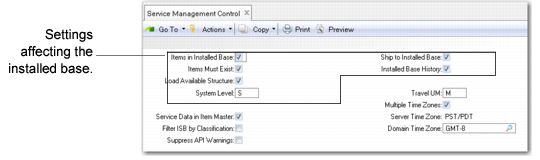
Your decisions regarding the installed base are implemented in through control program settings.
Service Management Control (11.24) illustrates settings in Service Management Control that affect the installed base.
Service Management Control (11.24)