QAD 2017 Enterprise Edition
>
User Guides
>
Service/Support Management
>
Installed Base
>
Service Item by Site Maintenance
Service Item by Site Maintenance
If you perform service activities at more than one site, the procedures you follow and the items you use may vary. For example, work centers names may be different or alternate parts used
Use Service Item by Site Maintenance (11.3.9) to tailor service BOMs and routings based on the site of the service activity. Where BOMs and routings apply, the system checks first for an item/site record. If this record does not exist, it uses the BOMs and routings for the item in Service Item Maintenance.
Before setting up service-structure data for items at different sites, consider how service functions determine a default site. For call-related functions, the system searches in the following order to determine a default site for an item being serviced.
1 The site associated with the assigned engineer in Engineer Maintenance
2 If the engineer does not have a site, the site associated with the engineer’s area
3 If these values are blank, a default spares site in Default Site Maintenance using the product line and service group of the item, and work code, item number, and area of the call
See
Search Algorithm for details on how default sites are found.
4 The site defined in the item master
5 The site associated with the end user’s customer in Customer Data Maintenance
In RMA Release to Work Order, the system uses the RMA receipt site.
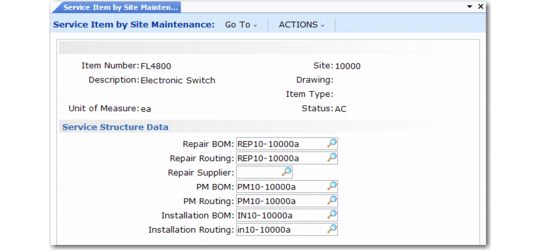
Service Item by Site Maintenance (11.3.9)
Item Number
Enter an item code from Item Master Maintenance. The BOMs and routings you specify here apply to this item when you service it at the associated site.
Site
Enter the code that identifies a site for defining unique BOMs and routings for the current item. Since items and procedures may vary by site, the system uses these BOMs and routings by default in call functions associated with this site.
After you enter or select a valid part number and site, the system fills in the other fields in this frame from the item record, for display only.
The fields for BOMs and routings are exactly the same as those in Service Item Maintenance.