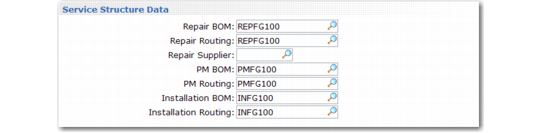
Service Structure Data Frame
Service structures and routings are important for streamlining data entry in call functions. They enable the system to load the items normally consumed in the service of an item and the sequence of operations performed into the detail of call quotes and Call Activity Recording.
See
Service Structures and Routings for details on how to set up routings.
You can associate three BOMs and routings with an item that the system uses under different circumstances:
• The system uses the repair BOM and routing for calls you created with work codes other than PM or Install with Call Maintenance, Call Quote Maintenance, and the Call Generator. The system also uses the repair routing on work orders created by RMA Release to Work Order. A repair BOM and routing normally apply only if Repairable is Yes; otherwise, a warning displays.
• The system uses the PM BOM and routing for calls it creates during PM scheduling in Contract Maintenance or with the PM work code in Call Maintenance, Call Quote Maintenance, or Call Generator. A PM BOM and routing normally apply only if the Days Between PM field is not zero; otherwise, a warning displays.
• The system uses the installation BOM and routing when it creates a call with the Install work code in Call Maintenance, Call Quote Maintenance, or Call Generator or when Invoice Post and Print creates an installation call for a newly sold item. An installation BOM and routing normally apply only if Installation Call is Yes; otherwise, a warning displays.
The printed call can include the component structure of the BOM and the routing steps in the form of the list of parts and procedures relating to the call item. The system can load these items and operations into the detail frames of Call Quote Maintenance or Call Activity Recording. Automatic loading streamlines the recording of operations and items consumed.
Service Structure Data Frame
Repair BOM
Enter a service structure defined in Service Structure Maintenance (11.19.5). This BOM code defines the items typically used to repair this item. The system uses the repair BOM when it creates a call with any work code other than Install or PM.
A printed call can include the items on the BOM in the form of a list of items needed during the service activity. You can also load the items on the BOM into the Item Usage frame in Call Activity Recording and Call Quote Maintenance. If Repairable is not Yes for the current item, a warning displays when you specify a repair BOM.
Repair Routing
Enter a service routing defined in Service Routing Maintenance (11.19.17). This code defines the normal sequence the engineer follows in repairing this item. It is the default when the system creates a call with any work code other than Install or PM.
A printed call can include the operations on the routing in the form of a list of procedures to be executed during the service activity. You can also load the operations on the routing into the Labor/Expense Usage frame in Call Activity Recording and Call Quote Maintenance. The system also uses the repair routing when RMA Release to Work Order creates a work order. If Repairable is not Yes for the current item, a warning displays when you specify a repair routing.
Repair Supplier
Identifies the supplier of repair parts. This field is for reference only.
PM BOM
Enter a service structure defined in Service Structure Maintenance (11.19.5). This BOM code defines the items an engineer typically uses during preventive maintenance of this item. The system uses the PM BOM when it creates a call with the PM work code.
A printed call can include the items on the BOM in the form of a list of items needed during the service activity. You can also load the items on the BOM into the Item Usage frame in Call Activity Recording and Call Quote Maintenance. If Days between PM is zero for the current item, a warning displays when you specify a PM BOM.
PM Routing
Enter a service routing defined in Service Routing Maintenance (11.19.17). This code defines the normal sequence of steps an engineer takes during a PM visit. The system uses it when it creates a call with the PM work code.
A printed call can include the operations on the routing in the form of a list of procedures to be executed during the service activity. You can also load the operations on the routing into the Labor/Expense Usage frame in Call Activity Recording and Call Quote Maintenance. If Days between PM is zero for the current item, a warning displays when you specify a PM routing.
Installation BOM
Enter a service structure defined in Service Structure Maintenance (11.19.5). This BOM code defines the items an engineer typically uses during installation. The system uses the installation BOM when it creates a call with the Install work code.
A printed call can include the items on the BOM in the form of a list of items needed during the service activity. You can also load the items on the BOM into the Item Usage frame in Call Activity Recording and Call Quote Maintenance. If Install Call is No for the current item, a warning displays when you specify an installation BOM.
Installation Routing
Enter a service routing defined in Service Routing Maintenance (11.19.17). This code defines the normal sequence of operations taken by an engineer to install the item. The system uses it when it creates a call with the Install work code.
A printed call can include the operations on the routing in the form of a list of procedures to be executed during the service activity. You can also load the operations on the routing into the Labor/Expense Usage frame in Call Activity Recording and Call Quote Maintenance. If Install Call is No for the current item, a warning displays when you specify an Installation routing.