Generating a Service Marketing Letter
Service usually involves direct communication with the end user. At times, it is necessary to contact a range or all end users in the installed base, perhaps to alert users to a new product upgrade, or warn them of a product defect.
Use Installed Base Marketing Letter (11.3.21) to create such letters. You can base the letter on comments you created in Master Comment Maintenance (1.12). To generate a letter to all users in the installed base, follow these steps.
1 Write a master comment in the form of a letter in Master Comment Maintenance (1.12). Write the comments in each required language. When the system generates the letter, it looks for comments in the addressee’s language.
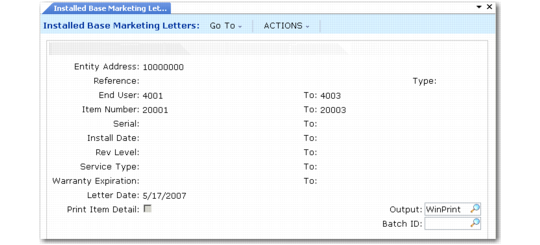
2 From Installed Base Marketing Letter (11.3.21), specify the master comment in the Ref and Type fields, then the options for selecting the end users to receive letters.
Installed Base Marketing Letters (11.3.21)
Company Address defaults from SSM Accounting Control (36.9.10). If you use pre-printed letterhead, leave the address code blank. Select end users to receive letters based on item number, serial, install date, revision level, service type, or warranty expiration. For example, you can create letters for end users who have items with warranties about to expire.
Letter Date accepts a free-form date description to print at the top of the letter. If Print Item Detail is Yes, the system also prints a list of attributes for the installed base item at the top of the letter.
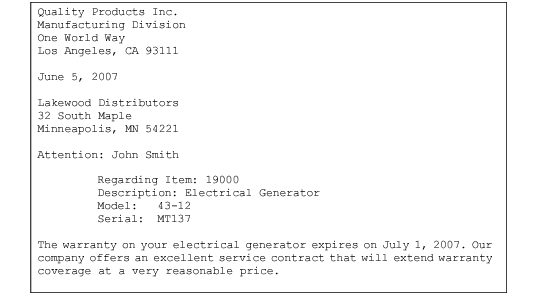
Sample Marketing Letter illustrates a sample marketing letter.
Sample Marketing Letter