End User Time Zone Change Utility
Use this program for two distinct purposes:
• Set up the correct time zone information for existing end users when you activate Multiple Time Zones.
• Change the time zone associated with an end user if that end user’s geographical location changes.
This utility updates each end-user record as a separate transaction. If it aborts for some reason, you can rerun it without adversely affecting database records.
Changing End Users During Activation
When you first activate MTZ, you initialize all time zones to the time zone of the current session, which is normally the time zone of the current domain. You must then establish the correct time zone for end users in each geographic region. Do this for groups of end users you select by state, postal code, or country.
Initially, the conversions performed by this utility differ depending on your response to the Current Times Relative to End User prompt. Use this prompt to tell the system how you normally entered call times in the past.
Yes means you entered times on calls for this end user relative to the their time zone. Specify Yes if you manually updated the date and time fields on a call to reflect the end user’s geographic location.
Example: A Los Angeles business has end users in New York. When the business took calls from these end users, the service operator routinely adjusted the call open time manually to reflect the time zone difference since, prior to activating MTZ, the system did not adjust for time zones.
If you accepted the date and time suggested by the system, the date and time associated with the call are not relative to the end user. They reflect the time zone of your current session, which is normally the domain time zone.
Changing End Users After Using MTZ
When MTZ is active and you create an end user, you must specify a time zone. This is true in End User Data Maintenance and in the other programs where you create end users such as Call Maintenance, Call Quote Maintenance, RMA Maintenance, Contract Maintenance, and Contract Quote Maintenance.
Once an end-user record exists, you can only change the time zone using End User Time Zone Change Utility. This is because the utility also updates each call associated with the end user so that call dates and times reflect the correct time zone.
When used for this purpose, you should leave the default Yes in the Current Times Relative to End User prompt. After MTZ is active, the system always stores time relative to the end-user time zone.
Note: Normally, you can update the time zone associated with a customer in Customer Data Maintenance. However, if the customer is also an end user, the two records share the same address information and you must use this utility to update the customer time zone.
Screen Reference
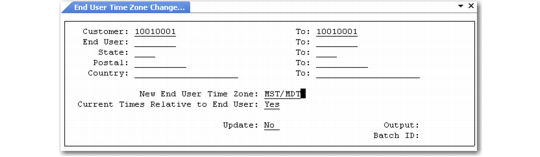
End User Time Zone Change Utility (11.21.22.20) illustrates End User Time Zone Change Utility.
End User Time Zone Change Utility (11.21.22.20)
Customer/To
The first and last customer in a range for selecting end users to update. This utility does not update customer records unless the customer is also an end user. Update the time zone associated with a customer who is not an end user in Customer Data Maintenance (2.1.1).
End User/To
The first and last end user in a range to be updated when you execute this utility. The system applies New End User Time Zone to these end users and updates open dates and times on their associated calls.
State/To
The first and last state in a range for selecting end user records to update.
Postal/To
The first and last postal code in a range for selecting end user records to update.
Country/To
The first and last country in a range for selecting end user records to update.
New End User Time Zone
Enter the time zone to be associated with end-user records updated by this utility. This must be a valid time zone in Multiple Time Zones Maintenance.
In addition to updating end-user time zones, the utility updates every call associated with the end users so that call dates and times reflect the correct time zone.
Current Times Relative to End User
Indicate how the system should interpret the times on calls for this end user.
If you are running this utility as part of the initial setup for time zones, enter Yes if your organization manually updated the date and time on calls to reflect the time zone of the associated user. Enter No if you accepted the time suggested by the system, which is the equivalent of the domain zone. For initial startup, this is usually No.
If you are changing the time zone associated with an end user after you implemented MTZ, leave the default Yes. Once the utility has converted the time zones, times are relative to the end user.
Update
Indicate whether the utility should be report-only or make changes to the database:
No: Leave the database records unchanged and generate a report listing the records affected. The report indicates how many call records the system must change to reflect the changes in end user time zones.
Note: Always execute the program with update set to No before actually making changes.
Yes: Modify the selected end-user records and related call dates and times.