QAD 2017 Enterprise Edition
>
User Guides
>
Service/Support Management
>
Multiple Time Zones
>
Effects of MTZ
Effects of MTZ
MTZ has wide-ranging effects on other service functions. The areas impacted, discussed in this section, include:
• Customers and end users
• Installed base
• Call management
• Engineer scheduling
Customers and End Users
If MTZ is active, you can associate time zones with customers and end users. The time zone for new end users defaults from the customer.
Customer Data Maintenance
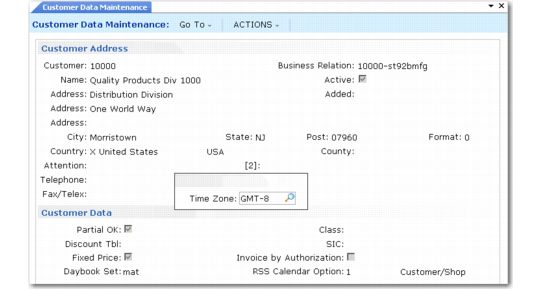
Time Zone Pop-Up in Customer Data Maintenance (2.1.1) illustrates the pop-up that appears in Customer Data Maintenance (2.1.1) when MTZ is active. The system uses the customer time zone as the default for end users associated with this customer.
Time Zone Pop-Up in Customer Data Maintenance (2.1.1)
Note: If a customer is also an end user, you cannot change the time zone in Customer Data Maintenance.
End User Data Maintenance (11.9.1)
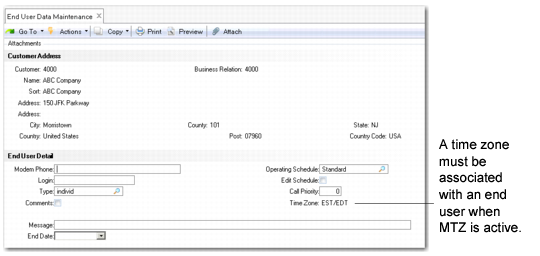
As illustrated in
Time Zone Field in End User Data Maintenance (11.9.1), when MTZ is active, a Time Zone field also displays in End User Data Maintenance. The time zone here determines how Call Maintenance displays and stores times when you take a call for this end user. The end user’s time zone also affects engineer scheduling, service coverage, and service pricing.
Time Zone Field in End User Data Maintenance (11.9.1)
The time zone field initially defaults from the end user’s customer; you can update it only when creating an end user. After an end-user record exists, use End User Time Zone Change Utility (11.21.22.20) to change the time zone. This utility ensures that the system updates any calls for the end user to reflect the new time zone.