Understanding Codes for Limits
Before you learn how to define limits, it is important to understand how service codes provide support for defining limits. The system uses three important codes: service categories, invoice sorts, and work codes.
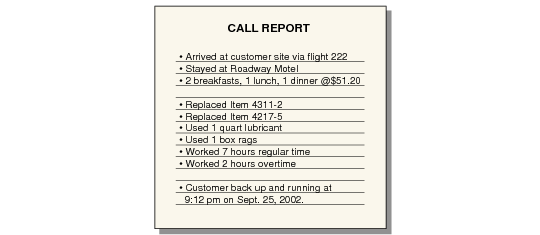
Service categories group the detail you record when you provide service in response to a call.
Sample Call Report illustrates a sample call report.
Sample Call Report
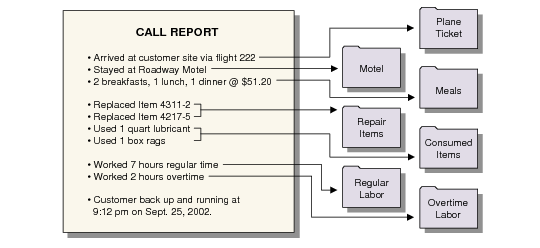
Each of the details on this report represents an instance of a service category. An organization can have as many or as few service categories as they need.
Call Details Map to Service Categories shows how you can categorize each detail of a call with the appropriate service category. Since the service category represents the lowest-level way of grouping detail, it is pictured as a file folder.
Call Details Map to Service Categories
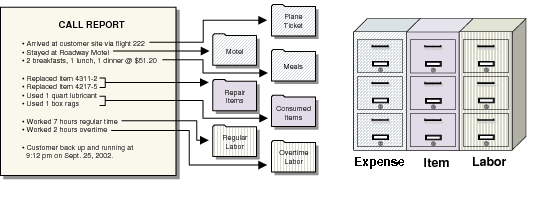
Each service category is associated with an invoice sort when it is defined. Normally you use three basic invoice sorts: for expenses, items, and labor. Invoice sort codes group all the details of related service categories for high-level presentation.
In
Invoice Sorts Group Service Categories, three file cabinets represent three invoice sorts. The system sorts the detail associated with a particular service category into one of three cabinets: expense, item, or labor. In this example, you can put a related folder in any drawer of the correct filing cabinet.
Invoice Sorts Group Service Categories
You can define generic coverage limits based on invoice sort codes. For example, you can define a simple limit for all expenses. However, you can also consider the work code when defining limits. Work codes group the service detail on a call based on the type of work.
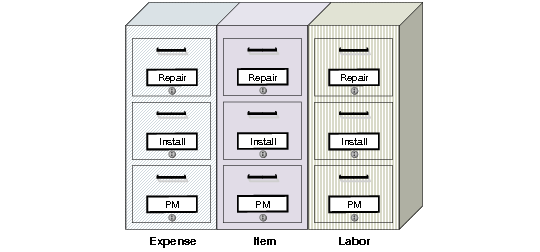
Work Code Adds More Detailed Control shows the result of adding three work codes: repair, install, and PM. Now the system sorts detail both by file cabinet and by drawer within the cabinet.
Work Code Adds More Detailed Control
Grouping information this way supports complex limit definitions. In
Work Code Adds More Detailed Control, the more work codes you use, the more drawers you need in each filing cabinet.
While invoice sorts do not give as much detail, with them you can make generic changes in coverage levels across the customer base or a specific service contract market. Work codes and service categories, on the other hand, provide the power to manage and change service levels in the most detailed situations.
You can combine work codes, service categories, and invoice sorts in almost unlimited ways. For example, you can base limits for service items on the kind of work done, but make limits for expenses generic, based on invoice sort. Or if you do not need detail, you can set up one limit for all the detail recorded.
You can use any work code and service category combination except a work code with fixed price set to Yes. You cannot use fixed pricing in conjunction with coverage limits.
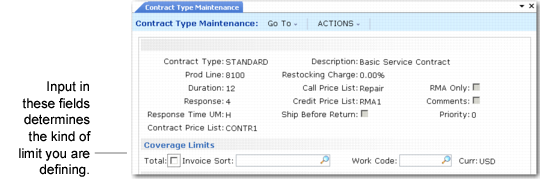
Invoice Sort or Work Code illustrates the Coverage Limits frame in Contract Type Maintenance. The Total, Invoice Sort, and Work Code fields determine the kind of limit you are defining:
• If Total is Yes, Invoice Sort and Work Code must be blank, and the record limits all service or defines a generic level of coverage.
• If Total is No and you enter an Invoice Sort value, the system applies this limit to the service categories associated with the specified invoice sort.
• If Total is No and you specify a Work Code, you must also specify a service category. The limit applies only to the specified combination of work code and service category.
Invoice Sort or Work Code
You can define any number of limits. The system uses limits for a work code and service category combination first. If it finds none, it uses those set up for invoice sorts, then those for the total. When you define limit amounts in a contract, the system always looks for a total limit amount to use in conjunction with the lower-level amounts.
Simple or Complex
Work codes and service categories enable you to track service activity in detail, but the detail introduces complexity into the rest of Service/Support Management, including implementation.
If you use work code and service category details in coverage, create clear policies on how to use the service types as templates for contracts. Without careful planning and implementation, it becomes easy to lose control of coverage limits and service costs. To clarify your setup, use charts like the one on
here.