Defining Service Levels with a Total Service Limit
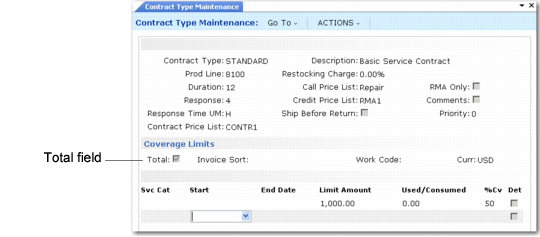
In Contract Type Maintenance, Total is the first field in the Coverage Limits frame, illustrated in
Total Field in Contract Type Maintenance. This field does two things:
• If lower-level limits exist, Total determines an aggregate amount applied to the cumulative total consumed for all service limits. The system applies this feature only when you copy limits into a contract.
• It enables you to set up a generic record for the system to use when more specific records do not exist.
Total Field in Contract Type Maintenance
To define a total limit, Invoice Sort and Work Code must be blank. The system uses the limit data if there are no other limits; you can set up simple, high-level, generic limits. For example, a contract type covers service activity at 50% up to 10,000. This record then applies to any kind of activity in Call Activity Recording.
When you define a total amount in addition to other more detailed records, the system uses it in conjunction with the other limits. For example, an invoice sort for labor has a $1,000 limit. Another invoice sort for items has a $1,000 limit. But you want an overall service limit of $1,500. The value in the Amount field when Total is Yes determines an aggregate limit for coverage.
When you record service in CAR for an item under an active contract with this service type, the system compares service activity against this total to see if service is over limit. The system still tracks costs against the invoice sort or work code and service category combination as appropriate. However, when you enter a value and Total is Yes, the system also compares the total service costs against this aggregate limit.
Example: Three limit records have a $750 limit for labor, items, and expense invoice sorts. You set an aggregate service limit of $1,500. You take the calls in
Sample Call Information and record the activity.
Sample Call Information
Call | Labor | Items | Expenses | Accumulated Total |
CA1 | 500 | 300 | 200 | 1000 |
CA2 | 200 | 300 | 100 | 600 |
Invoice Sort Total | 700 | 600 | 300 | 1600 |
Even though the amount recorded is under the $750 limit amount for each invoice sort, the $100 of expenses for CA2 is not covered, since it exceeds the total limit of $1500.
When you specify an amount with Total set to Yes and the aggregate reaches $1,500, this item is over its service limit regardless of the limits on individual invoice sorts or service categories. The servicing company has now met its contractual requirements and the system applies the over‑limit charge code to service activity.