Labor/Expense Pricing for CAR
Price lists for labor and expenses consumed in CAR are based on service category. You can define as many service categories as you need, each representing a particular kind of labor or expense charge.
For example, if you are tracking travel expenses in CAR you might set up three service categories for ranges of hotel room expenses: room1, room2, and room3. Then you set up prices for each service category using Service Pricing Maintenance.
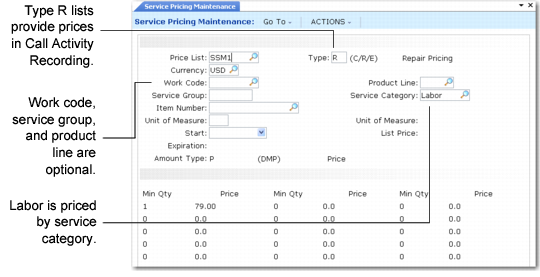
Repair Price List for Service Category illustrates a repair price list for a labor service category.
Repair Price List for Service Category
The system can consider other factors in the search for labor and expense prices: work code, service group, and product line. For example, the price for installation labor may be different than for repair labor. If you include service group and product line when you set up prices, they refer to the service group and product line of the item being repaired. This is different than for item price lists, where service group and product line refer to the item being consumed.
If the system finds no price for the labor or expense on the list, it defaults to zero.
Unit of Measure
Set up labor and expense prices with a blank unit of measure.
Price Lists for Less than One Unit
For the system to calculate prices for partial units, set up a price for a minimum quantity of 0. The system uses this price if, for example, you record a half hour of labor. This is especially important for labor and expense price lists, since they are more likely to be used for partial units.
Amount Type
Prices for labor and expenses cannot use a discount amount type, because, unlike items, there is no list price to discount. Costs, on the other hand, are available for both labor and expenses. The system derives labor costs from the work center associated with a standard operation, a routing step, or the Service Work Center in Call Management Control. If you define expense costs on an expense cost list, you can use both amount type M and P with labor and expenses.
When you create a type P list, CAR reads the price of the labor or expense from the price list. When you create a type M list, CAR determines the price for the labor by adding a price from the price list to the standard labor cost associated with the service work center. Similarly, the system determines the price for an expense by adding the price list price to the list price defined on an expense cost list. In either case, if the system does not find a cost, the price is zero.
Search Order
During processing, the system looks for prices in the sequence listed in
Search Order for Labor and Expense Prices.
Search Order for Labor and Expense Prices
Search Order | Work Code | Service Group | Product Line | Service Category | Item Number |
1 | | | | | |
2 | | | | | |
3 | | | | | |
4 | | | | | |
5 | | | | | |
6 | | | | | |
Included in the price list search are the call currency and effective days. Set up labor and expense prices with a blank unit of measure.