QAD 2017 Enterprise Edition
>
User Guides
>
Service/Support Management
>
Automatic Pricing
>
Service Price List Copy
Service Price List Copy
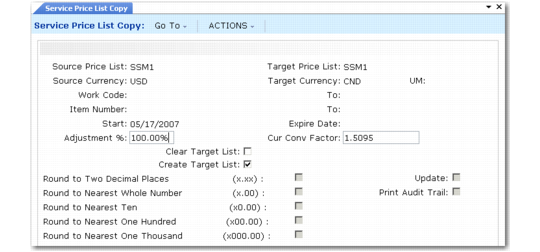
Service Price List Copy (11.17.4), illustrated in
Service Price List Copy (11.17.4), is similar to Price List Copy (1.10.2.5), with additional selection criteria for service attributes. Use it to quickly create alternate price lists from one base price list, automatically recalculating prices based on currency exchange rates. You can also adjust existing price lists by increasing or decreasing prices with an adjustment percent.
Service Price List Copy (11.17.4)
Source Price List
Enter a service price list code for the system to use as the source of the data it copies to the target price list.
Source Currency
Enter the currency of the prices being copied. The system copies pricing information and currency rate from the source price list to the target price list for the range of work codes and item numbers you specify.
Target Price List
Enter the code for the system to use as the destination of the information being copied. The target and source price list can be the same. In this case, the system adds an ending effective date to the source list and a starting effective date to the target list. If the target list is not the same as the source and does not exist, you can create it. If it does exist, you can clear it or add to it.
Target Currency
Enter the currency for the system to use on the target prices. The source and target currency can be the same—leave blank for the system to default the source currency. If you are copying from one currency to another, the system calculates and displays a default Currency Conv Factor using the exchange rate effective on the price list start date. The system adjusts prices on the target list using the conversion factor you specify.
UM
Unit of measure for the target prices. The system copies only prices in this unit of measure from the source price list. Leave blank to copy prices regardless of the unit of measure.
Work Code and To
Enter a range of work codes for the system to use as selection criteria in choosing prices to copy.
Item Number and To
Enter a range of item numbers for the system to use as selection criteria in choosing prices to copy.
Start
Start date defaults to today’s date and defines the start date for the new pricing structure created by the copy. The system applies this field differently in different situations:
• If the source and target codes and currency are the same and the date you enter matches the start date currently on the source price list, the system does not create a new price list. Instead, it modifies the existing price list according to any adjustment percentage you enter.
• In other cases when the source and target codes and currency are the same, the system uses the Start Date value as the start effective date on the target list and adds an ending effective date on the source list—the day before the target’s start date.
• If the source and target codes are different, the system uses the start date on the target and the source list is not affected.
Expire Date
If you specify a value here, the system uses the expiration date as the end effective date for the target price list.
Adjustment %
Defaults to 100.00%. The system multiplies specific prices (amount type P) by the adjustment percent, then rounds to the specified number of decimal places. It also multiplies discount and markup percentages (amount types D and M) by the adjustment percent. If the percentage is greater than 100%, amounts are increased. If the percentage is less than 100%, amounts are decreased.
Cur Conv Factor
Enter a conversion factor to use when the source and target price list currencies are not the same. The system calculates and displays a default Currency Conv Factor using the exchange rate in effect on the price list start date. If effective exchange rates are not found, Cur Conv Factor defaults to 1. You can modify the conversion factor, if needed. However, the value cannot be 0.
Clear Target List
Defaults to No. Determines if the system clears the target price list before copying in the new prices. If No, the system adds the prices to the existing target price list. If Yes, it clears the target price list first and then copies the new prices.
Create Target List
Defaults to Yes and indicates that the target price list should be created if it does not exist. If Yes, the system creates a list if one does not exist; if No, it does not. If Create Target List is Yes and the list exists, Clear Target List determines if the system clears the list before the copy, or if it adds an end effective date to the old prices.
Round to Two Decimal Places, Round to Nearest Whole Number, Round to Nearest Ten, Round to Nearest One Hundred, Round to Nearest One Thousand
Set only one of these to Yes, indicating the rounding method for the system to use when creating the new price list structure.
Update
Defaults to No. Determines if the system updates the target price list based on the values specified. No is usually specified to create a report of potential changes before they are made. Run Service Price List Copy first using the report-only option by setting Update to No and Print Audit Trail to Yes. This lets you review changes before actually creating or updating the target price.
Print Audit Trail
Indicate if the system should print an audit report.
Yes (the default): The system prints a report showing the effect of applying the updates to the target price list.
No: The system does not print a report.