Correcting an Unposted Invoice
If you have billed a contract in error and the invoice has not been posted, use Billing Reversal Maintenance to reverse the effects of the billing. This program removes mistakenly billed amounts from unposted contract invoices. If all billing amounts are reversed on an invoice, the invoice is removed from the system.
To correct an unposted invoice, follow these steps:
1 Use Billing Reversal Maintenance to delete the pending invoice and reset most billing dates. Billing Reversal Maintenance resets Coverage Date on both the contract header and detail and Next Bill Date on the header. It does not reset Last Bill Date since there was some billing activity.
2 Use Contract Maintenance to correct the elements of the contract that are in error, such as price, quantity, or billing cycle.
3 Use Billing Release to Invoice to re-release the contract to billing.
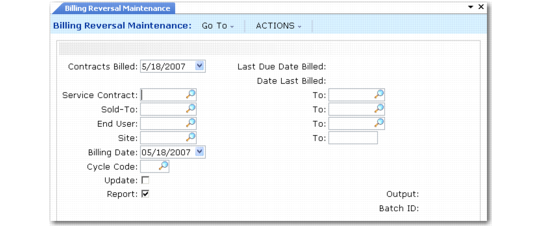
Billing Reversal Maintenance (11.5.18.18) illustrates Billing Reversal Maintenance (11.5.18.18).
Billing Reversal Maintenance (11.5.18.18)
Use this function to reverse a range of invoices selected by contract number, customer, end user, or billing cycle. The Contracts Billed field is the critical selection criterion; this must match the date you executed Billing Release to Invoice.
Execute this function first with Update set to No and Report set to Yes to review the potential impact of the reversal before you perform it.
Contracts Billed
Enter the date that the pending invoice amounts were generated. This is the date you executed Billing Release to Invoice (11.5.18.13).
Note: This is not necessarily the same as the value specified in the Billing Date field in Billing Release to Invoice. You can change Billing Date from the default, which is the current system date.
The billing date becomes the order date of the pending invoice. The execution date becomes the ship date, displayed in reports such as Sales Order Tracking Inquiry (7.13.10).
Last Due Date Billed and Date Last Billed.
These fields are output only. Date Last Billed is the date Billing Release to Invoice was last run. Last Due Date Billed is the date you previously entered in the Contracts Due Until field. Whenever you run the release program, the system updates these dates.
End User and To
Enter an end-user range for selecting contract billings to reverse. Leave blank to reverse billings for all end users that match the other criteria.
When an end-user range is specified, only detail information for matching end users is reversed. When summarized billing has been used, the reversed amounts are subtracted from the summarized totals.
Billing Cycle
Optionally enter a billing cycle for selecting pending invoices to reverse. If you specify a Billing Cycle, Billing Reversal Maintenance selects invoices only for this billing cycle code. If Billing Cycle is blank, the system processes all billing cycle codes.
Billing Date
The default is the system date. The system uses Billing Date as the effective date for transaction history. No selection is based on this date.