End-User Schedules
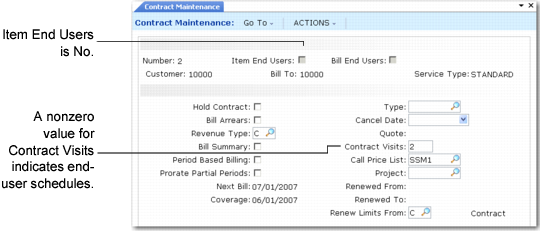
Filling in Visits in Contract Maintenance (11.5.13.1) illustrates the header Visits field in Contract Maintenance.
Filling in Visits in Contract Maintenance (11.5.13.1)
To create a preventive maintenance schedule that applies to the each end user:
1 Specify a number of visits on the contract header. A nonzero value in this field activates scheduling. The number of visits indicates the number of times during the service contract duration that PM visits will be made to each end-user site. After you complete line-item entry, an End User PM Schedule window displays proposed dates for the PM visits.
Note: If you do not specify header visits, you can still generate PM schedules for individual contract line items.
2 Set the PM Item field to Yes for the items on the contract requiring visits. This field defaults to Yes if Days between PM is any nonzero value for the item in the Service Item Maintenance (11.3.7). When the system creates a PM call, it includes all items with PM Item set to Yes as line items, unless they already have individual schedules.
Note: If you create end-user schedules and none of the items on the contract have PM Item set to Yes, you can still create a call for the first visit, but it will not have any line items. This can be useful if you want to generate general follow-up calls at specific intervals.