Setting Up Call Status Codes
A call is managed according to its status, which relates to the call’s position in its life cycle. Is the call active, pending, an emergency, or closed? Calls are moved from status to status either manually or by the Escalation Monitor. Call Activity Recording also can make certain call status changes.
Create status definitions in Call Status Code Maintenance (11.1.21.1). You can set up as many status definitions as you need. Define up to six in Call Management Control for the system to apply. Unless you are using call escalation, you must apply other status changes manually. Therefore, you may want to keep the call life cycle simple.
Call status codes are user defined and can take any format an organization chooses. Some service organizations prefer numerical status codes or abbreviations. Others use more intuitive names. Meaningful codes make it easier to understand quickly where a call is in its life cycle.
For example, when a new call comes in, its status can be OPEN. Later, when you assign an engineer to the call, the status becomes ASSGND. When the problem is resolved, the call status is CLOSED.
Call Activity Recording uses call status codes when it processes calls and makes decisions. In CAR, you assign statuses to the call and to the call line items.
Special Statuses
Certain statuses have special meaning to the call management programs. Define these special statuses in the Call Status frame of Call Management Control (11.1.24).
Open Status. This is the general status for an open call and the initial status for a new call, unless you are using escalations. An open call is dynamic; its item line and other data can change at any time.
Hold Status. The hold status prevents recording new activity or generating an invoice for a call or line in Call Activity Recording. A material order cannot be ordered for a call on hold. For anything further to happen to the call, change its status. You can still generate an invoice for existing activity in Call Invoice Recording, if necessary.
Complete Status. The complete status means the call is ready for invoicing—at least one invoiceable report with detail exists. However, you can still modify related data, order service items for it with a material order, and record new activity.
Close Status. The close status is the final status of a call and indicates all service activity for this call is finished and ready for invoicing. Once a call is closed, you cannot record more activity or create material orders for it. However, you can reopen closed calls by changing their status. You can move closed calls to history and delete and archive them when they are fully invoiced. See
Managing Call Status Changes for details on the requirements and effects of call closure.
Cancel Status. Canceling a call is similar to closing it, but only a call without service activity can be canceled. You cannot generate an invoice for a canceled call since you cannot record activity for it.
These statuses are especially important in Call Activity Recording and Call Invoice Recording.
Call Status Code Maintenance
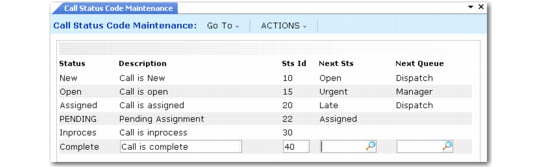
Define call status codes with Call Status Code Maintenance (11.1.21.1).
Call Status Code Maintenance (11.1.21.1)
Status
Enter a unique name (maximum 8 characters) identifying this call status. Making the name recognizable can help users quickly identify its purpose.
Description
Enter a brief description (maximum 24 characters) of the code to help users identify its use and purpose.
Sts ID
This field can indicate the order in which statuses occur in the life cycle of a call. A lookup displays call statuses in numeric order as defined by the status ID, rather than alphabetically.
Next Status
Specify the next status that normally follows this status in the call life cycle. The next status specified here provides a default for the Next Status field in Call Escalation Maintenance when you define an escalation with a call status as part of the key. The system also uses it in the Next Status field of Call Maintenance if no other default is found.
Next Queue
Specify the next queue to which the system should route calls with the next status. This field is for reference; you can use it when setting up escalations.