Call Queues
You can place each call in a call queue when you create it. The queue is a holding area you define to indicate who is responsible for the call. You also use queues with escalation sequences to redirect incomplete calls automatically so they obtain needed attention.
Sample Queues
Each queue is a unique place where calls are routed according to their problem, status, or other criterion. Queues are tools for locating and tracking calls. Use the Call Queue Manager to review and update calls according to queue. You define call queues to fit your service process.
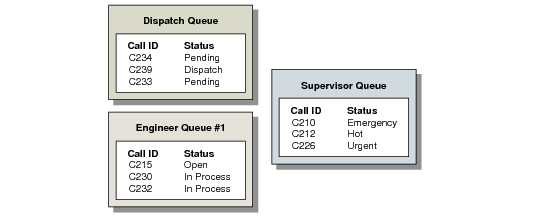
Sample Call Queues illustrates some sample queues.
Sample Call Queues
In
Sample Call Queues, new, unassigned calls are placed in the dispatch queue, where they await assignment to an engineer. The engineer queue is for calls that have been assigned to engineers and are being resolved. The supervisor queue is for calls that must be brought to the attention of a supervisor. Each call has a status reflecting its urgency.
Call Queue Maintenance
Define as many call queues as you need in Call Queue Maintenance (11.1.21.7). Specify two queues—a default call queue and default quote queue—in Call Management Control. Unless you are using call escalation, you must move calls from one queue to another manually. Therefore, you may want to limit the number of queues to a well-defined set.
Call Queue Maintenance (11.1.21.7)
Queue
Enter a name or code uniquely identifying this queue.
Description
Enter a brief description (maximum 24 characters) of the code to help users identify its use and purpose.
Open Calls by Queue Operational Metric
Use the Open Calls by Queue metric on the Service and Support Operational Metrics page in the Metrics folder to view a snapshot of open calls by call queue.
For details on creating or modifying operational metrics refer to
Introduction to QAD Enterprise Applications User Guide.