Call Entry Overview
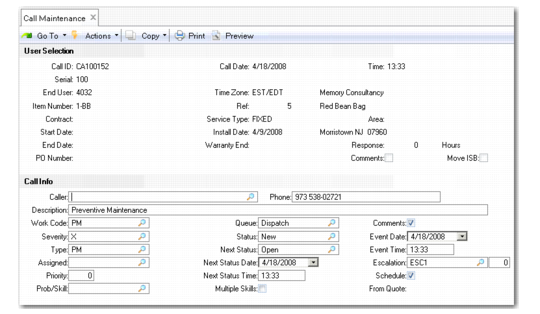
Enter calls in Call Maintenance (11.1.1.1), illustrated in
Call Maintenance (11.1.1.1).
Call Maintenance (11.1.1.1)
Entering calls in Call Maintenance is easy, since it is often used in an online environment where support personnel enter information as they interact with end users. Some of the features that facilitate data entry include the following:
• The system automatically generates call numbers from the Call Prefix and the Next Call ID fields in Call Management Control.
• If you receive a call from a new end user, you can define the end user directly in Call Maintenance, without having to add a detailed end- user record in End User Create (27.20.3.1) and End User Data Maintenance (11.9.1). For details, see
Calls from Unknown Users.
• You can look up end users in a variety of ways using the End User Selection pop-up.
• The system retrieves the coverage detail from the warranty defined with Service Item Maintenance or the active service contract. Otherwise, it uses the default service type defined in Call Management Control.
• If the end user has been set up to require a purchase order for service, you can enter it on the first frame. This prevents wasting time on calls that cannot be serviced.
• You can enter call comments from the first frame, so you can record the details reported by the end user immediately, and make decisions about other fields later.